
.png)





Publishing Structured Content: A Beginner's Guide
Think of your content library like a set of Lego blocks. In a traditional workflow, you’re given a single piece of clay to sculpt a new model every time. With a modern structure authoring tool, you have a box of perfectly crafted, reusable blocks. Need an installation guide? You pull the "introduction" block, the "safety warning" block, and a series of "procedural step" blocks. This modular approach is managed by component content management solutions for structured authoring. You build a library of intelligent components that can be mixed, matched, and updated in one place, simplifying the process of publishing structured content. This guide explains how this method works and the powerful benefits it brings.
Key Takeaways
- Shift from writing documents to creating components: The biggest change is learning to create small, reusable blocks of information instead of linear documents. This separates your content from its formatting, making it flexible enough for any channel.
- Achieve consistency and efficiency at scale: By reusing these components, you can update information in one place and see it change everywhere automatically. This saves an incredible amount of time, reduces errors, and guarantees a uniform brand experience.
- A solid plan is your most important tool: A successful transition depends on strategy. Start by defining your content model and establishing clear governance workflows before you even think about migrating content or choosing software.
What Is Structured Content Authoring?
Let’s get straight to it: structured content authoring is a method for writing that breaks your content down into small, reusable pieces, often called "components" or "topics." The core idea is to separate the actual content—the words, the data, the instructions—from its presentation and formatting. Instead of writing a 50-page manual from start to finish in a single document, you create a library of independent, intelligent blocks of information that can be mixed and matched as needed.
This approach forces you to think about your content in a more modular way. Each component is created to stand on its own and answer a specific question or describe a single concept. These components are then assembled and published in various formats, like a PDF, a help website, or an in-app guide. It’s a fundamental shift from traditional, linear document creation to a more flexible, database-like approach to content.
The Core Idea: Thinking in Reusable Components
The biggest mental shift in structured authoring is learning to think in components. Imagine you have an important safety warning that needs to appear in ten different user manuals. In a traditional workflow, you’d copy and paste that warning ten times. If it ever needs an update, you have to hunt down all ten instances and change them manually, hoping you don't miss one.
With structured authoring, you write that warning once as a single, reusable component. Whenever you need it, you simply pull that component into your document. If the warning needs to be updated, you change it in one place, and it automatically updates everywhere it’s used. This method of creating structured content saves an incredible amount of time, reduces the risk of errors, and ensures consistency across your entire product line.
Structured vs. Traditional Authoring: What's the Difference?
If you’ve ever managed documentation in a standard word processor, you know the pain points. These tools mix content and formatting together, making it nearly impossible to reuse information efficiently. Trying to maintain consistency across hundreds of documents becomes a manual, error-prone chore. Collaboration is messy, with version control issues and endless "final_v2_final_FINAL" file names.
Structured authoring solves these problems by design. Because content is separate from its presentation, you can stop worrying about fonts and layouts while you write. The system handles the formatting during publishing. This is a key reason many teams move to a standard like DITA XML, which provides a clear set of rules for structuring content, making it predictable, manageable, and much easier for teams to work with.
Why Your Content Model Matters
Before you can start creating components, you need a blueprint. That blueprint is your content model. A content model defines the different types of content you’ll create and the rules for how they can be connected. For example, your model might specify that a "how-to" topic must contain a series of "steps," and that each step can optionally include an "image" or a "note."
This might sound technical, but it’s an essential strategic step. By defining these structures upfront, you ensure every piece of content is consistent and fits into a logical system. This is the foundation of effective content governance, as it guarantees that everyone on your team is creating content in the same way, making it truly reusable and scalable for any output.
How Does Structured Content Authoring Work?
Structured content authoring flips the traditional writing process on its head—in a good way. Instead of thinking about a final document, you focus on creating intelligent, self-contained blocks of information. This method is built on a few core principles that work together to make your content more flexible, consistent, and scalable. It’s about building a library of content components that you can assemble and reassemble for any purpose, rather than writing and rewriting the same information for different documents.
Separating Your Content from Its Presentation
One of the biggest shifts in structured authoring is learning to separate what you write from how it looks. Think of it this way: your content is the raw information—the words, the steps in a procedure, the warnings. The presentation is the formatting—the fonts, colors, and layout that get applied when it’s published. You focus entirely on creating clear and accurate content without worrying about styling.
This separation is incredibly powerful. Because the content isn't locked into a specific design, a single component can be automatically formatted for any output. That means the same instruction can appear in a printed PDF manual, a responsive website, or a mobile app, each with a look and feel that’s perfect for that channel. This is all handled during the publishing process, ensuring a consistent experience for your users everywhere.
Understanding the Role of XML and Schemas
So, how does the system enforce this separation and structure? This is where XML (Extensible Markup Language) and schemas come into play. XML is a common format used to wrap your raw content in meaningful tags, like <title> or <step>, turning plain text into intelligent components. But on its own, XML is just a set of syntax rules. The real power comes from a schema, which acts as the rulebook for your content model. The schema defines which tags are allowed and in what order, ensuring that a "procedure" topic always contains a valid sequence of "steps." This validation is what makes your content predictable and reliable, forming the foundation for a system where you can confidently manage thousands of reusable components.
Authoring with Reusable Content Components
Instead of writing page after page in a linear document, structured authoring involves creating content in small, reusable chunks called components or topics. A component can be anything: a single paragraph, a product description, a list of specifications, or a safety warning. Each component is a standalone piece of information that makes sense on its own.
You then build your documents by assembling these components like building blocks. Need to create an installation guide? Pull in the introduction, the safety warnings, the step-by-step procedure, and the troubleshooting components. The best part is that each component lives in one place. If you need to update a warning, you change it once, and that update automatically appears in every single document that uses it. No more hunting down every instance and copy-pasting changes.
Adding Structure with Taxonomy and Metadata
How do you keep track of all these components? That’s where taxonomy and metadata come in. Each piece of content you create is tagged with metadata—labels that describe what the content is about. This metadata can include the product version, audience type, content type (like "concept" or "task"), and other keywords that make up your taxonomy, or classification system.
This intelligent tagging makes your content discoverable and dynamic. It allows you to easily find the exact components you need and even automate document assembly based on specific rules. For example, you can instantly generate a user guide for expert-level users for a specific product model. This level of content governance ensures that the right information gets to the right person, every time, without manual effort.
What Are the Benefits of Structured Authoring?
Adopting structured authoring isn't just about changing how you write; it's about transforming what your content can do. By shifting from linear documents to a component-based approach, you create a more flexible, efficient, and scalable content ecosystem. This method introduces some major improvements to your team’s daily work and your company’s bottom line. Let's walk through the key benefits you can expect.
Improve Efficiency by Reusing Content
Imagine writing a safety warning or a product description once and then using it across dozens of documents. With structured authoring, that’s exactly how it works. You create reusable components, or topics, that can be pulled into any output you need. When a detail needs updating, you change it in one source file, and the update automatically populates everywhere that component is used. This "write once, reuse everywhere" model saves an incredible amount of time, reduces repetitive work for your writers, and ensures your structured content is always accurate without tedious manual checks.
Keep Your Content Consistent Across All Channels
When multiple writers contribute to your documentation, maintaining a consistent voice, style, and format can be a real challenge. Structured authoring solves this by building the rules directly into the writing environment. Because content is separated from its presentation, you guarantee that every output—whether it’s a PDF manual, a knowledge base article, or an in-app help tip—has the same look and feel. This level of content governance ensures a uniform, professional experience for your users, reinforcing your brand’s credibility and making information easier for customers to digest, no matter where they find it.
Scale Your Content Operations
As your company grows, so does your content. Structured authoring is built for scale. Because you’re reusing content instead of rewriting it, your translation costs drop significantly. Once a component is translated, you can reuse it endlessly without paying for another translation. This makes global expansion much more manageable and cost-effective. It also simplifies the process of managing your content library. Instead of dealing with hundreds of monolithic documents, you’re working with a clean, organized repository of components that can be quickly assembled to meet new demands.
Create Simpler, More Collaborative Workflows
Say goodbye to confusing email threads and messy "final_v3_final" documents. Structured authoring platforms often include built-in workflows that streamline collaboration between writers, editors, and subject matter experts. With clear review cycles and version control at the component level, team members can work on different parts of a document simultaneously without overriding each other’s work. This makes the entire content creation process more transparent and efficient. It reduces the risk of errors and frees your team to focus on creating high-quality content instead of managing chaotic processes.
Allow for Simultaneous Editing
One of the biggest bottlenecks in traditional document workflows is waiting your turn. When a file is "checked out" by a colleague, everyone else is locked out, grinding progress to a halt. Structured authoring eliminates this problem entirely. Because content is broken down into independent components, multiple team members can work on different topics for the same publication at the same time. Your technical writer can be drafting installation steps while an engineer updates the technical specifications, and neither will override the other's work. This is a core function of a system built for managing structured content, as it tracks changes at the component level, making collaboration seamless and truly parallel.
Streamline Translation and Localization
If you serve a global audience, structured authoring is a game-changer for localization. Content is broken down into smaller, independent components. When it’s time to translate, you only send the new or updated components to your localization vendor, not the entire document. This dramatically reduces translation turnaround times and costs. This granular approach also makes it easier to manage localized content variations. Heretto’s translation management capabilities, for example, help you handle multiple languages within a single, unified system, ensuring your global content stays in sync.
Enable Content Personalization at Scale
When you hear "personalization," you might think of marketing emails that use your first name. In technical content, it’s much more powerful. Personalization is about delivering the right information to the right person at the right time. Structured authoring makes this possible by allowing you to tag content components with metadata. You can flag a procedure for "expert users" or a warning for a specific "product model." When a user accesses your content, the system can automatically assemble a document tailored to their exact needs, filtering out anything that isn't relevant to them. This is a form of reuse, but it’s what allows you to reuse similar, not just identical, pieces of content, unlocking massive efficiency gains.
Gain Advanced Content Control
Moving to a structured authoring environment means leaving behind the chaos of uncontrolled documents and gaining precise control over your entire content ecosystem. Because content is created as independent components within a defined model, you can manage every piece of information with a level of detail that’s impossible in traditional systems. This granular control extends to how your content is reviewed, updated, and audited, creating a more secure and reliable workflow for your entire team. It’s a system that enforces consistency by design, so you can focus on the quality of the information itself.
Maintain Granular Version Control
If your team is still dealing with file names like "Manual_v4_final_EDITED," you know the pain of traditional version control. Structured authoring solves this by managing versions at the component level. Instead of tracking changes to an entire 200-page document, you track the history of each individual topic. This allows multiple writers to work on different parts of the same publication simultaneously without overriding each other's work. With clear review cycles and a complete version history for every component, you always know who changed what and when, making the entire process of managing your content more transparent and efficient.
Ensure Compliance with Complete Audit Trails
For teams in regulated industries, proving compliance is non-negotiable. Structured authoring platforms provide the tools you need to maintain a complete, defensible audit trail for every piece of content. Because every action—from creation and editing to review and approval—is tracked at the component level, you can instantly see the entire lifecycle of any given topic. This built-in system of content governance streamlines collaboration with subject matter experts and legal teams, ensuring that all required approvals are logged before publishing and giving you a clear, accessible record for any compliance checks.
Future-Proof Your Content for AI
Artificial intelligence, chatbots, and other emerging technologies are powered by data. The cleaner and more structured that data is, the better they perform. Unstructured content from traditional documents is messy and difficult for machines to interpret accurately. Structured content, on the other hand, is a perfect fit. Because it separates the raw information from its formatting and tags it with rich metadata, it creates a clean, predictable source for AI applications. By creating structured content today, you’re not just solving your current documentation challenges; you’re building a future-ready content repository that can power the next generation of intelligent customer experiences.
Is Structured Authoring Right for Your Team?
You might think structured authoring is only for highly technical fields, but its benefits extend to any team that deals with complex information. If your content needs to be accurate, consistent, and delivered to multiple places, this approach can completely change how you work. It’s less about what you write and more about how you need to manage and scale that writing over time.
From global enterprises managing thousands of documents to specialized teams in regulated industries, the need for a smarter content strategy is clear. Structured authoring provides the foundation for creating content that is modular, reusable, and easy to govern. This means less time spent on repetitive updates and formatting fixes, and more time focused on creating clear, valuable information for your audience. Many successful teams find that this shift not only improves efficiency but also significantly enhances the quality and consistency of their final output. If you're facing challenges with content silos, brand inconsistencies, or slow publishing cycles, it’s a sign that your team could benefit from a more structured approach.
Why Technical Documentation Teams Need It
For technical documentation teams, structured authoring is a game-changer. Technical content is often complex, detailed, and requires absolute precision. Think about user manuals, API documentation, or installation guides where a single error can cause major problems. Structured authoring offers a modern, more effective way to create this content by breaking it down into reusable components. Instead of rewriting the same safety warning for ten different products, you write it once and reuse it everywhere. When an update is needed, you change it in one place, and it automatically populates across all relevant documents, ensuring accuracy and saving an incredible amount of time.
How It Supports Enterprise Content Operations
Large businesses often struggle to manage content creation at scale. With multiple teams, authors, and reviewers involved, maintaining consistency and control can feel impossible. Structured authoring brings order to this complexity. It establishes a clear framework that governs how content is created, reviewed, and approved. Because content is built from standardized, pre-approved components, it ensures that everything from product descriptions to support articles adheres to brand guidelines and terminology. This approach helps you manage your content efficiently, even when many people are involved, ensuring everything stays accurate and on-brand for the long haul.
For Teams That Need to Meet Strict Compliance
If you work in a regulated industry like finance, manufacturing, or life sciences, you know that accuracy isn't just a goal—it's a requirement. Structured authoring is essential for teams that need to meet strict compliance standards. It helps you create accurate content faster by making the writing and review process less repetitive and prone to human error. By using pre-approved content blocks for legal disclaimers, policy statements, or compliance information, you can reduce risk and simplify audits. This level of content governance ensures that critical information is consistent and traceable across all your documentation.
Key Industries for Structured Authoring
Structured authoring is especially helpful for companies that create a lot of technical documents, have many products, sell globally, or need to follow strict rules. Think of industries like manufacturing, where a single product might have dozens of variations, or software, where documentation needs to be updated constantly. In fields like life sciences and finance, content isn't just complex—it's heavily regulated. The precision required in these areas makes structured authoring essential for maintaining compliance and accuracy. It provides the framework needed for effective content governance, ensuring that every piece of information is consistent, traceable, and approved before it reaches the customer.
Essential for Distributed and Collaborative Teams
When your writers, editors, and subject matter experts are spread across different locations, keeping everyone on the same page is a major challenge. Structured authoring platforms bring order to this process with built-in workflows that clarify who does what and when. Because work happens at the component level, team members can edit different parts of a publication at the same time without overriding each other's changes. This makes the entire content creation process more transparent and efficient. It reduces the risk of errors and frees your team to focus on creating high-quality content instead of managing chaotic processes.
Perfect for Publishing to Multiple Channels
In a world where your audience is everywhere, you need to be too. Structured authoring lets you create content once and then seamlessly publish it to different platforms without endless reformatting. A single product feature description can be automatically styled for your website, a mobile app, a printable PDF data sheet, and an internal knowledge base. Because the content is separate from its presentation, you can deliver information to any channel your customers use. This "create once, publish everywhere" model eliminates tedious copy-and-paste workflows and ensures a consistent experience for your users, no matter where they find your content.
What Kind of Structured Authoring Tool Do You Need?
Once you decide to adopt structured authoring, the next step is finding the right tools for your team. The market offers a range of options, from specialized editors to comprehensive platforms, each designed to solve different problems. Understanding the landscape helps you choose a solution that fits your team’s skills, content strategy, and long-term goals. The right toolset not only makes the transition smoother but also ensures you get the full benefits of structured content, like reusability and scalability.
All-in-One Structured Authoring Platforms
Think of an all-in-one platform as the entire workshop, not just a single tool. These integrated systems provide everything you need for the whole content lifecycle, from creating structured content to managing and publishing it. The idea is to have a single source of truth where your team can collaborate without juggling different software. It’s like working with Lego blocks where each piece is designed to fit perfectly with others. These platforms often include features for content governance, translation management, and analytics, giving you a complete view of your content operations from a central dashboard.
Exploring DITA and XML Authoring Tools
If structured authoring is the method, then DITA (Darwin Information Typing Architecture) is a popular standard used to execute it, especially for technical documentation. DITA XML authoring tools are specifically designed to help writers create content that follows this standard. They allow you to build small, reusable pieces of content called "topics." These topics can be mixed, matched, and updated across countless documents, which is a game-changer for keeping information consistent and accurate. Using a DITA-based approach means an update in one place can automatically populate everywhere that topic is used, saving an incredible amount of time.
The Role of a Component Content Management System (CCMS)
A Component Content Management System, or CCMS, is the central hub where all your content components live. It’s the brain of your structured authoring operation, storing and managing every reusable topic, image, and metadata tag. One of the biggest advantages of a CCMS is that it separates content from presentation. Your writers can focus entirely on creating clear, accurate content without worrying about formatting. The CCMS handles all the styling automatically when it’s time to publish, ensuring your documents look perfect and consistent across every channel, from a PDF manual to a knowledge base article.
CMS vs. CCMS: Understanding the Key Differences
While their names sound alike, a Content Management System (CMS) and a Component Content Management System (CCMS) are designed for very different tasks. A standard CMS is typically used for managing websites, like blogs or marketing pages. It thinks in terms of whole pages or posts, where the content and its design are often bundled together. A CCMS, on the other hand, is built for managing complex documentation at a much more granular level. Instead of pages, it manages a library of reusable components—individual paragraphs, warnings, or procedural steps—that can be assembled into any document you need.
The key difference is that a CCMS is purpose-built for structured authoring. It separates your content from its presentation, which is what makes large-scale reuse and multichannel publishing possible. While a CMS helps you manage a website, a CCMS helps you manage an entire ecosystem of intelligent, interconnected content. It’s the system that powers the "write once, reuse everywhere" model, making it the right choice for teams focused on technical documentation and scalable content operations.
How a Traditional CMS Works
If you’ve ever tried to manage technical documentation in a traditional CMS or word processor, you’re familiar with the challenges. These systems treat content as monolithic documents or pages. When you need to reuse a piece of information, your only option is to copy and paste it. This creates a messy, disconnected web of content. If that original piece of information needs an update, you have to manually hunt down every single instance and change it, which is a recipe for errors and inconsistencies.
This approach also locks your content into a single format. Because these tools mix the content and its styling together, it’s nearly impossible to publish that information to different channels without a lot of manual reformatting. The content is stuck in its original presentation, whether that’s a webpage or a PDF. This is a major limitation for teams that need to deliver consistent information across multiple platforms. The alternative is creating structured content, which solves these problems by design.
Authoring Tools vs. XML Editors
Not all authoring interfaces are created equal. Your team will likely work in either a pure XML editor or a more user-friendly authoring tool. A pure XML editor gives you direct access to the code, offering maximum control but requiring significant technical training. On the other hand, many modern structured authoring tools provide a familiar, word-processor-like experience. They hide the complex XML in the background while still enforcing the content structure. This approach lowers the learning curve, making it easier for your entire team to adopt structured authoring without needing to become coding experts.
How to Get Started with Structured Authoring
Making the switch to structured authoring is a strategic move, not an overnight flip of a switch. It requires planning, a clear framework, and getting your team on board. But by breaking the process down into manageable steps, you can set your organization up for more efficient and scalable content operations. Think of this as building a solid foundation for all your future documentation. The initial effort pays off with long-term gains in consistency, reusability, and speed.
The goal is to create a system that works for your specific needs, from the way you organize information to how you train your writers. A well-planned transition ensures that you’re not just adopting new software, but a smarter way of working. Let’s walk through the four key phases to get you started on the right path. Each step builds on the last, creating a comprehensive plan for a successful implementation of a Component Content Management System (CCMS).
Start by Planning Your Content Model
Before you write a single component, you need a blueprint. That’s your content model. Think of it as the set of rules that defines your different content types—like procedures, concepts, and reference topics—and how they fit together. This is where you decide what information is required for a specific topic type and what is optional.
The first step is to analyze your existing documentation to identify recurring patterns and information types. By creating structured content models, you separate the substance of your information from its presentation. This allows you to break everything down into small, reusable chunks that can be assembled in different ways for different outputs. A solid content model is the cornerstone of your entire structured authoring strategy.
Build a Solid Governance Framework
Once you have a content model, you need rules to keep everything organized and consistent. A governance framework defines who does what, when, and how. This includes setting up approval workflows, defining roles and permissions, and creating templates to ensure every piece of content is complete and accurate.
Good content governance also means establishing a system for tracking changes. You should have a clear record of who updated a component and when, which is critical for audits and quality control. This framework ensures that when you update a piece of content at its source, that change is reflected everywhere it’s used. It’s your single source of truth for maintaining content integrity across the board.
Get Your Team Ready for a New Workflow
Switching to structured authoring can be a significant change for writers accustomed to traditional, linear documents. The learning curve is real, as your team will need to get comfortable with new tools, terminology, and a component-based mindset. It’s less about writing a document and more about creating a database of interconnected information.
Invest time in comprehensive training that covers not just the "how" but also the "why." Help your team understand the benefits of reuse and consistency. Provide hands-on sessions with your new authoring tools and offer ongoing support through resources like internal wikis or help documentation. A well-supported team is far more likely to embrace the new methodology and use it effectively.
Train Your Team to Write for Reuse
The most critical part of training is teaching your team to stop thinking in terms of pages and start thinking in terms of topics. This means each piece of content should be created as a standalone component, designed to be self-contained and context-agnostic. A writer needs to ask, "Does this procedure make sense on its own, without the introduction I just wrote?" This modular approach requires writers to avoid transitional phrases like "As we discussed earlier..." because that component might be reused in a context where there was no "earlier." Your training should focus on this new mindset of creating structured content that can live anywhere. When your team understands that they are building a library of reusable assets rather than a single, linear document, the logic clicks into place and the true efficiency of this method is realized.
How to Migrate Your Existing Content
Moving your existing documentation into a new structured system is often the most daunting step. Start with a content audit to decide what to migrate, what to archive, and what to rewrite from scratch. Not all content is worth the effort of conversion, so be strategic about what you bring over.
For the content you decide to keep, plan the migration process carefully. This involves converting documents, cleaning up the resulting components, and validating them against your new content model. This can be a time-consuming and resource-intensive process, so consider a phased approach. You might start with a single product line or your most frequently updated documents. Tackling migration in manageable chunks makes the project feel less overwhelming and allows you to refine your process as you go.
Common Challenges (and How to Solve Them)
Making the switch to structured authoring is a big move, and like any significant operational change, it comes with a few hurdles. It’s not just about adopting new software; it’s about shifting how your team thinks about, creates, and manages content. From learning new writing methods to getting everyone on board, these challenges are real, but they are completely solvable with a bit of planning and the right strategy.
The key is to anticipate these obstacles so you can address them head-on. Instead of seeing them as roadblocks, think of them as part of the implementation process. By understanding the common pain points—like the initial learning curve, resource management, and stakeholder alignment—you can build a clear path forward. This proactive approach ensures a smoother transition and helps your team start reaping the benefits of structured content, like improved efficiency and consistency, much faster. Let's walk through some of the most common challenges and discuss practical ways to solve them.
Getting Past the Initial Learning Curve
Let’s be honest: learning new tools, writing methods, and languages like DITA can feel daunting at first. Your team is used to a certain way of working, and structured authoring requires a different mindset—thinking in components instead of documents. The solution is to treat this as a gradual upskilling process, not an overnight switch. Start with comprehensive training focused on the "why" behind structured authoring, not just the "how." Begin with a small pilot project to let your team practice and build confidence. This allows them to learn in a lower-pressure environment and see the benefits firsthand, which makes the new process feel much more approachable.
Leveraging Familiar Authoring Tools
The idea of trading a familiar word processor for a complex XML editor is often a major roadblock. Thankfully, you don't have to become a coding expert overnight. Many modern structured authoring platforms are designed to bridge this gap by offering a familiar, word-processor-like experience. These tools handle the complex XML structure in the background, enforcing your content model without forcing writers to look at a single line of code. This allows your team to focus on creating clear, accurate content without getting bogged down by formatting. The system takes care of the styling during publishing, making the transition much smoother for everyone involved.
How to Manage Costs and Resources Effectively
Adopting structured authoring involves an investment in both tools and time. You'll need to budget for software like a Component Content Management System (CCMS) and set aside time for your team to train, which might temporarily slow down production. The best way to handle this is by framing it as a long-term investment with a clear return. Calculate the potential savings from content reuse, reduced translation costs, and increased efficiency. Present a business case that highlights how the upfront costs will lead to significant long-term gains. Phasing your implementation can also help spread the costs and resource allocation over time, making the transition more manageable.
Making the Case to Your Stakeholders
A smooth transition requires support from across the organization, not just your content team. Departments like quality, regulatory, and IT need to be involved from the start. If they don’t understand the benefits or feel included in the process, you might face resistance later on. To prevent this, involve stakeholders in the tool selection and migration planning stages. Show them case studies of how other companies in your industry have succeeded with structured authoring. When they see how it improves compliance, consistency, and time-to-market, they’ll become your biggest advocates rather than obstacles.
Designing Workflows That Actually Work
Structured authoring thrives on clear, repeatable processes. You can't just drop a new tool into your old workflow and expect it to work. You need to redefine how your team collaborates, reviews, and approves content. This means establishing a solid content governance framework with defined roles, responsibilities, and style guidelines. Map out your new content lifecycle, from creation to publication, and document it clearly. Start with a simple workflow and refine it as your team gets more comfortable. Using a platform with built-in workflow management can make this process much easier to implement and enforce.
Building Your Structured Content Strategy
Switching to structured authoring isn't just about adopting a new tool; it's about rethinking your entire approach to content. A solid strategy is your roadmap to making the transition smooth and successful. It ensures everyone is on the same page and that your new processes are built to last. By taking the time to plan upfront, you can avoid common pitfalls and start seeing the benefits of structured content much faster. Let's walk through the key steps to building a strategy that works for your team.
First, Assess Your Current Content Needs
Before you can choose a solution, you need a crystal-clear picture of what you’re trying to solve. Many teams I talk to are dealing with complex content that involves multiple contributors, strict review cycles, and the constant pressure to maintain accuracy. Does that sound familiar? Start by asking yourself a few questions: How many people need to create and approve content? Do you have to meet specific regulatory or compliance standards? How often is your content updated, and where does it all need to go? Answering these questions will help you define your requirements and build a business case for creating structured content in the first place.
How to Choose the Right Platform
Once you know what you need, you can find the right tool for the job. The market has everything from bare-bones XML editors to user-friendly platforms that feel more like a word processor while still enforcing your content rules. When you’re evaluating options, think about ease of use for your team, how well the tool supports collaboration, and whether it can publish to all the channels you need. You also want a system that can grow with you. A comprehensive Component Content Management System (CCMS) can provide an all-in-one solution that handles everything from authoring and review to translation and publishing.
Build Workflows That Last
A great tool is only half the battle; your processes are what make it all work. This is your chance to design workflows that make collaboration seamless. Define clear roles, review cycles, and approval gates so everyone knows their part. Use templates to ensure every document is complete and consistent from the start. One of the biggest advantages of a structured system is the ability to see who changed what and when, which is a huge help for accountability and updates. Establishing strong content governance from day one makes it much easier to keep your content accurate and fresh over the long term.
Related Articles
- Streamlining Help Documentation with Structured Authoring Tools
- How Content Authoring Tools Simplify Content Creation and Management
- The Role of Topic-Based Authoring in Multi-Channel Publishing
Frequently Asked Questions
How is this different from just using templates in a word processor? That’s a great question because it gets to the heart of the matter. A template controls the look and feel of a document, but the content inside is still one big, unstructured block. Structured authoring goes a step further by breaking the content itself into small, intelligent components. Think of it this way: if you update a paragraph in one document based on a template, you still have to find and update that same paragraph in ten other documents. With structured authoring, you update the source component once, and it automatically changes everywhere it’s used.
Do I need to be a developer or learn to code to use structured authoring? Absolutely not. While structured authoring often uses standards like DITA XML behind the scenes, modern platforms are built for writers, not coders. The best tools provide a familiar, user-friendly interface that lets you focus on creating great content. The system handles all the complex code in the background, ensuring your work follows the correct structure without you ever having to look at a line of code.
Is structured authoring only useful for technical documentation? While it’s a natural fit for technical content, its principles are valuable for any team that manages complex information at scale. Consider marketing teams that need consistent product descriptions across a website, data sheets, and partner portals, or HR departments creating training materials that share core policy information. If you find your team constantly copying, pasting, and trying to keep the same information in sync across multiple documents, a structured approach can make your work much easier.
What's the biggest challenge when getting started, and how do I prepare for it? The biggest hurdle is usually the mental shift from writing linear documents to creating a library of reusable components. It takes a little practice to learn how to write a topic that can stand on its own and make sense in multiple contexts. The best way to prepare is to start small with a pilot project. Choose one product manual or a specific set of articles to convert first. This gives your team a low-pressure environment to learn the new process and see the benefits for themselves before you go all-in.
How does structured authoring actually save money? The savings come from making your entire content process more efficient. First, content reuse dramatically reduces the time your writers spend on repetitive updates and manual checks for consistency. Second, it significantly lowers translation costs. Instead of sending entire documents for translation, you only send the new or updated components, and you can reuse previously translated components endlessly. This efficiency also helps you get products to market faster and reduces the risk of costly errors from inconsistent information.
.png)
Heretto (Formerly easyDITA): A Faster Content Engine
When people hear “DITA,” they often think of complex code and a steep learning curve. But at its core, DITA is based on one simple, powerful idea: stop duplicating content. Instead of copying a procedure or a warning message into ten different documents, you write it once and link to it everywhere it’s needed. When you need to make an update, you change it in one place, and it’s instantly corrected everywhere. This single shift from copy-pasting to linking is what makes teams so much faster. It’s the foundation of structured content, and it’s why we built Heretto, formerly EasyDITA, to make this process seamless.
Why DITA Delivers Faster, More Efficient Content
It powers faster content, at scale.
DITA is faster for a number of reasons, which we’ll discuss below. But before we get into those details, let’s explore why being faster in technical content production matters to a business.
Connecting Products and People with Great Documentation
Great documentation is more than just a set of instructions; it’s a critical bridge between your product and the people who use it. For many potential customers, your documentation is a key part of their evaluation process. They look at your help content to see if your company is serious about supporting them after the sale. A well-organized, clear, and comprehensive documentation site builds immediate trust and gives people confidence that they’re making the right choice. It shows you’re invested in their success, which can turn a curious prospect into a committed customer.
This connection deepens after the purchase. When users can find answers quickly and easily, it transforms a moment of potential frustration into an experience of empowerment. This is where the power of a solid content strategy becomes clear. By creating structured content, you can deliver the right information at the right time, turning user confusion into confidence. A positive support experience doesn’t just solve a problem; it reinforces the value of your product and can turn everyday users into your most loyal advocates and fans.
How Faster Content Reduces Support Costs
Self-service is the least expensive and most preferred way for a customer to interact with a company. Not all interactions can be self-service, but for the ones that can, it’s the best. When it comes to onboarding, troubleshooting, and product support, the speed limiter is generally content. If customers can’t quickly find answers or the information they’re looking for in your content library, they contact support; it’s that simple.
Depending on your company’s situation, solving a customer’s problem with content rather than a support ticket can be 1000s or 10,000s times less expensive. It’s massively more efficient.
The simple truth is that your support costs are a function of your human-required issues + not covered self-service issues. The lowest hanging fruit is producing the content to cover all self-service issues, and in order to do this, your team needs to be faster at content production, because covering all self-service is often a lot of content.
Reducing Support Tickets with a Self-Service Portal
A self-service portal directly reduces the number of support tickets your team has to field. When customers can find answers on their own, it improves their experience and saves the company significant resources. In fact, solving a problem with content can be thousands of times cheaper than handling a live support ticket. This efficiency is a game-changer for any business looking to scale its support operations without scaling its headcount.
Companies that adopt self-service solutions see substantial operational improvements. It’s common for organizations to experience up to a 40% drop in customer support questions after launching a portal. This frees up support agents to focus on more complex issues that require a human touch. At the same time, content teams become more agile, with the ability to publish documents up to 60% faster, which keeps the self-service content fresh and accurate.
Beyond the immediate cost savings, a well-organized self-service portal builds trust with potential customers. When users can easily find comprehensive answers in your documentation, it gives them confidence in both the product and the company. A great documentation site signals that you are serious about helping them succeed, turning your content into a powerful asset for customer acquisition and retention.
Turn Your Documentation into a Sales Tool
Prospects check documentation for two primary reasons: vibe and validation.
We all know what a robust, professional documentation experience looks and feels like. It’s like walking into a hotel lobby that is well staffed, clean, organized, and well maintained. This is the vibe. It translates to trust. When prospects see that an organization takes their product documentation seriously, it builds a feeling that the organization takes their success seriously.
We all know that marketing websites are there to sell stuff, they’re there for the company. Yes, they’re helpful to us, but the primary reason a company builds a website is to generate revenue, it’s for them.
Documentation sites are the opposite. They exist exclusively to help the customer. Yes, they also help the company reduce costs, but the primary reason for the content is helping customers.
This intrinsic truth is something everyone feels. When you see a company with an extremely expensive marketing site, but a minimal or forgotten documentation experience, it shows their priorities. And, of course, the inverse is also true, and perhaps more powerful. A great documentation site builds a prospect’s confidence that they have a solid and robust place to turn when they have an issue or want more from the product they purchased.
Faster matters because building this trust creating experience requires a team to produce a lot of high-quality content on a continuous basis.
How Much Faster Can Your Team Be with DITA?
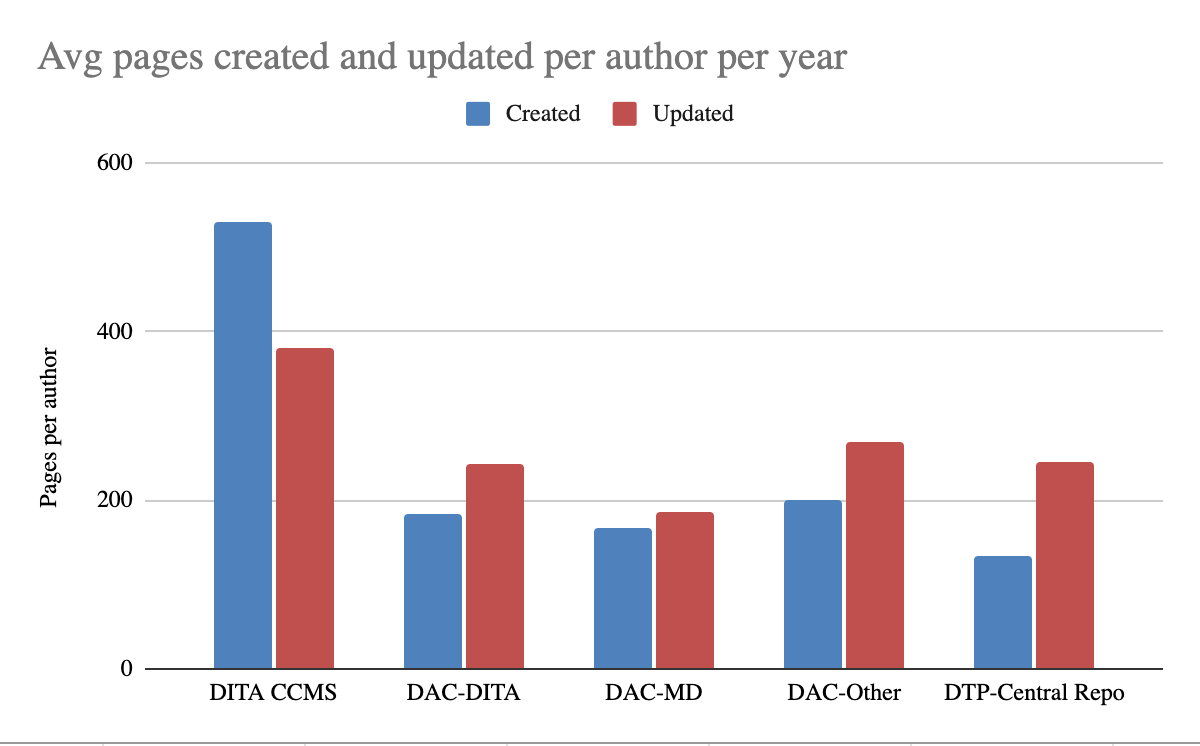
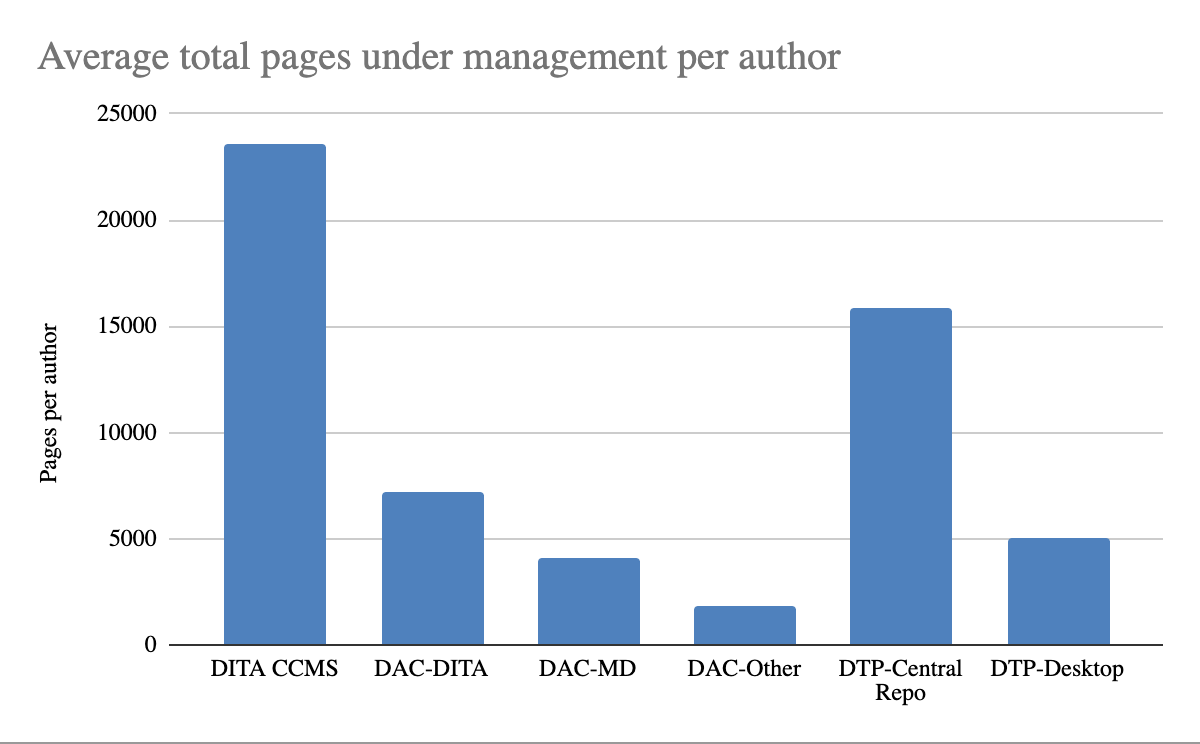
Our data points to between 2 and 3 times faster. We’ve seen this trend throughout our experience with customers and also across several surveys. Here’s the data from our latest survey on this topic.
Starting with average pages created and updated per year per author, DITA in a CCMS (not necessarily Heretto) is roughly twice the volume of the other common options.
No surprise that…
Real-World Results with Heretto
The general data on DITA's efficiency is compelling, but the results get even more specific when you use a dedicated platform. With Heretto, companies see tangible improvements across their entire content operation. For instance, teams can publish their documents up to 60% faster. This speed comes from powerful features like content reuse, which can also slash content costs by up to 90%. By creating structured content once and reusing it everywhere it’s needed, you eliminate the redundant work that slows teams down and drives up expenses. It’s about working smarter, not just harder, to get high-quality information out the door.
This efficiency has a direct impact on the customer experience and your support team's workload. After implementing Heretto's documentation portal, organizations often report up to a 40% drop in customer support questions. When customers can find answers up to three times faster, they don’t need to create a support ticket. This not only lowers operational costs but also builds customer confidence and trust in your product. You can see how this plays out for different companies in our case studies. These aren't just abstract numbers; they represent a fundamental shift in how companies support their users.
Will DITA Really Make My Team Faster?
The key question. The answer is, of course, it depends. On the graph below, the key thing to determine is where the intersection point is for your team.
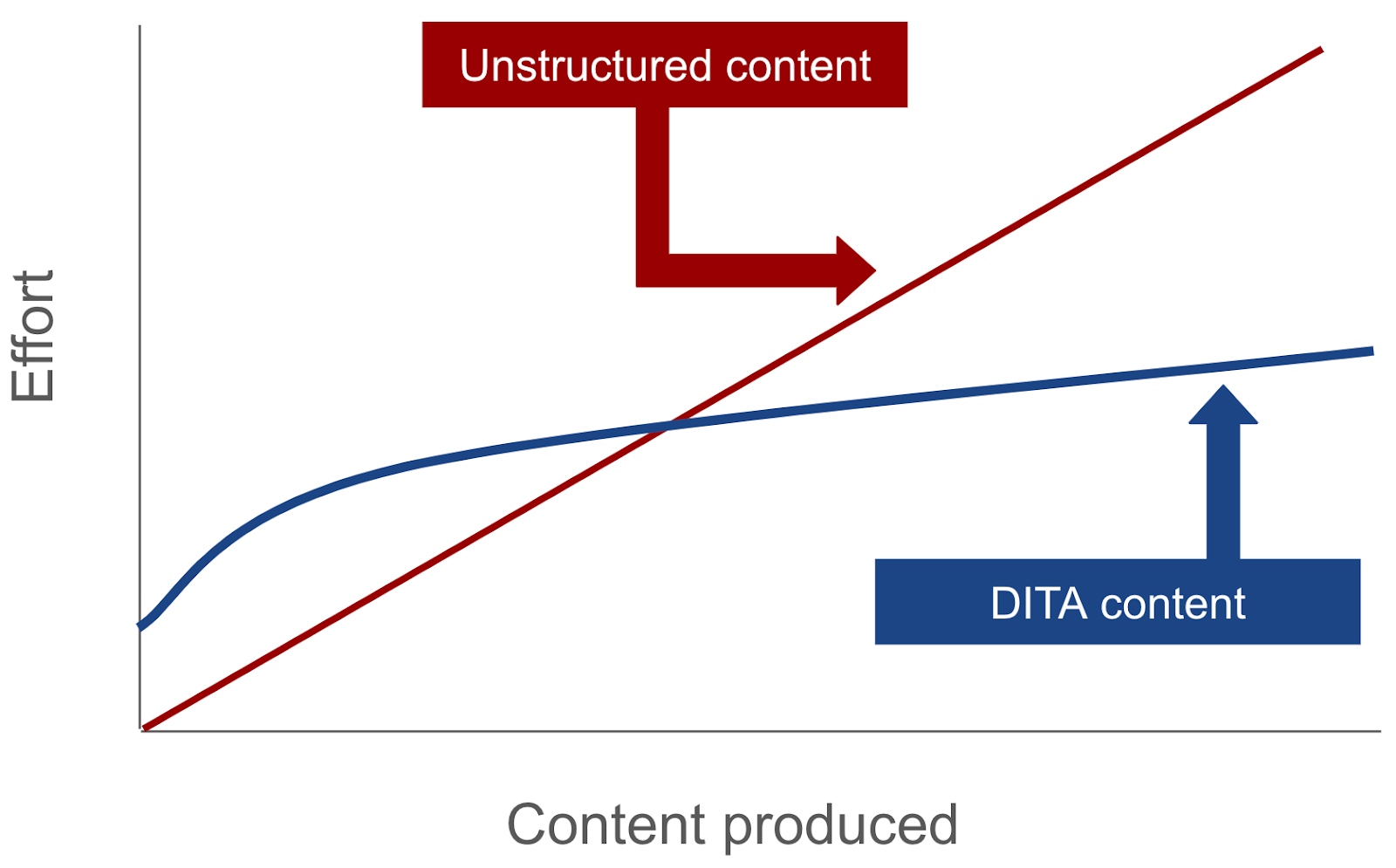
There are ways to impact the position and slope of both lines, but fundamentally, the key factors are going to be reuse, personalization, and multichannel, which are the capabilities that make DITA faster. We go into the details of how these work below, but fundamentally these are the things that impact the slope of the DITA content line.
Teams that have no potential for reuse, no need for personalization, and only publish to one place, can sometimes still see enough benefit from the efficiency of automated publishing or reduction in translation costs.
From easyDITA to Heretto: Evolving with Your Content Needs
Our journey and name evolved to better reflect the comprehensive solution we provide for modern content challenges. The shift from our previous name to Heretto represents more than a rebrand; it marks our commitment to adapting alongside the technical documentation teams we serve. As customer expectations for content have grown, so have the tools needed to meet them. We’ve expanded our platform to include new capabilities, including AI-powered tools, to help you handle the entire content lifecycle more effectively. This evolution ensures that your team has a forward-looking partner dedicated to making your content operations as efficient and impactful as possible, helping you connect your products with your audience through great documentation.
What is Heretto?
Heretto is a component content management system (CCMS) that provides an all-in-one platform for your technical content operations. Built on the power of DITA XML, it gives your team a single, centralized environment for creating, managing, and publishing structured content. Instead of juggling disconnected tools for authoring, reviews, and delivery, you can streamline your entire workflow within our system. This unified approach eliminates information silos and ensures that everyone on your team is working with the same up-to-date, approved content, which is the foundation for producing consistent and accurate documentation at scale.
By treating content as modular, reusable components, the Heretto CCMS helps you work smarter, not harder. This structure is what makes it possible to update information in one place and have it automatically reflect everywhere it’s used, saving countless hours of manual work. It also simplifies complex processes like translation management and ensures strong content governance across all your documentation. Ultimately, Heretto is designed to transform your technical content from a cost center into a valuable asset that improves customer success and builds trust in your products.
How Exactly Does DITA Make Teams Faster?
This is where we start getting into the technical details. If you want a tl;dr, it’s reuse.
Reuse comes in three different varieties:
- Source content reuse: One piece of content is used in multiple deliverables
- Personalization: One piece of content used, and altered, for different consumers
- Multichannel publishing: One piece of content used in different experiences
Source content reuse is the type of reuse most people are thinking of and referring to when they say they need reuse, but personalization and multichannel publishing are every bit as powerful and compelling for many organizations. Taken together, these three capabilities are how teams efficiently and consistently reuse content for different purposes, people, situations, and channels. And this is the single greatest capability of DITA as a methodology for content.
There are other important reasons organizations choose DITA, which we’ll go into later, but reuse is truly the central pillar of value.
The core reason we chose to build Heretto around DITA and why technical content teams choose DITA to build their content on is efficiency. DITA is about 50% more efficient than other methodologies when implemented well. Additionally, it’s the only content standard that doesn’t have scalability limits. DITA isn’t the best choice for all types of content, or even the best choice for all technical content, but it is the best choice for teams with large content sets.
Let’s look more closely at the types of reuse.
Work Smarter with Source Content Reuse
Source content reuse is often what people mean when simply referring to reuse. Reusing source content is the foundation of scalable reuse. It’s what gives teams double digit efficiency improvements through eliminating copy-paste workflows used to manage similar content across multiple documents.
The traditional way people reuse content across documents is simply to duplicate it. Often this means copying it from where it’s created and pasting it into the places it’s the same. When this is one to one between a source and end-use location, it’s often not painful enough to fix. But when copying smaller pieces between source files to account for shared content becomes required, the workflow can quickly become too expensive to do manually. There is also a governance aspect to this issue, when content is copied, its chain of custody becomes disconnected and it’s not possible to ensure the end consumer has exactly what they should.
With DITA, content is linked together rather than being copied. If I wanted to use this paragraph in another article, I would simply create a link to it and when that article was published, it would have this paragraph inserted at the position of this link. In DITA-speak, this link is called a conref, which is short for content reference. This linking to reuse content can be done at almost every level, from individual words up to entire documents.
Source reuse has downstream impacts as well. Governance, for example, is often a key driver and is enabled by a strong reuse simply because when content that is going to be used in many places is reviewed people apply more rigor and scrutiny. And while governance is its own aspect, a great deal of governance is simply ensuring that the right thing is presented to the end user and reuse is a critical capability in ensuring that result.
Collaborative Authoring in the Heretto CCMS
When multiple authors work across many documents, traditional copy-paste workflows create version control issues and inconsistencies. A Component Content Management System (CCMS) changes this dynamic entirely. In Heretto, teams aren't just editing separate, static documents; they are contributing to a centralized repository of content components. This modular approach allows authors to work on different topics simultaneously without overwriting each other's work. The focus shifts from wrangling entire documents to managing structured content, creating a more efficient and scalable system for technical documentation teams to produce and maintain information.
This collaborative environment is powered by the source reuse capabilities of DITA. When an author updates a single, reusable component—like a critical safety warning or a product setup procedure—that change automatically populates everywhere the component is used. This eliminates the tedious and error-prone task of hunting down and updating every instance of that information manually. By working from a single source of truth within the Heretto CCMS, teams can ensure the content they deliver is always consistent, accurate, and up-to-date, which directly strengthens content governance and customer trust.
Personalize Content for Every User
When most people hear the word personalization, they think of a marketing email where your name gets put in or Amazon suggesting new products based on the ones you’ve previously bought, but that’s not at all what it is in documentation.
Personalization in documentation is a type of reuse, but another way to think of it is that personalization and reuse are two sides of the same coin. Personalization is what unlocks reusing similar pieces of content rather than only being able to reuse content that is exactly the same. The most common example of this is two products that are very similar but have different names. In this case, DITA allows you to make the name a variable that changes based on the product so that you can reuse all the content around it. This is personalization, you’re personalizing the content to the product that the person owns.
Personalization is also flagging (adding metadata) to content that only applies to some audiences. A step in an install procedure may only apply to the version of a product sold in Europe. When a reader in the US sees that content, the step is removed, personalizing the content for their use case.
At a high level, personalization is just two things: switching content that is in variables and removing the content that is irrelevant for users other than the user viewing it.
Back to the statement that personalization and source reuse are two sides of the same coin. When a personalized experience is your objective, you can’t do it at any kind of scale without source reuse because without reuse the process of personalization demands that you copy content. And if the efficiency of reuse is your primary aim, you can’t accomplish it without personalization because the small differences, like names and specific call outs, in text that is otherwise identical will prevent that text from being reused. It is the synergy of these two capabilities in DITA that unlocks the value of both of them.
Reach Your Audience Everywhere with Multichannel Publishing
The only page, snippet, or answer that matters is the one a person uses. Multichannel publishing is actually the most basic form of reuse. It’s all the form of reuse that allows technical content teams to power future applications. The problem with most content is that it’s built for a single end use case. Microsoft Word documents are written to be documents. Knowledge-base articles are written in the knowledge base. Chatbot responses are built into the chatbot. And so on. With DITA, you focus on building great content in a semantically rich manner, then use pipelines to convert it into end user applications. This means you can power helpsites, in-application or in-product, AI agents, and print/PDF all from the same source, and all without any manual labor other than a publish button.
Multichannel publishing is especially important today because we’re entering into a multi-agenentic future and each agent is a channel. Organizations that want tight control over their bots and AI agents need tight control over the inputs into those bots and agents. DITA provides this by allowing teams to treat each agent as a channel and reuse content across them seamlessly and efficiently.
One-Click Publishing with Heretto Deploy
All the efficiency gained from reuse and personalization comes together at the final step: publishing. This is where your structured content becomes a tangible asset for your customers. Heretto Deploy simplifies this entire process into a single action. With one click, you can send your DITA content to all its destinations—help websites, customer portals, PDFs, and even AI chatbots. This automated approach to publishing ensures your content is consistent everywhere, building trust with your audience. More importantly, it’s incredibly fast. By removing the manual labor of formatting content for different channels, teams can publish their documentation up to 60% faster, getting critical information to users exactly when they need it.
How Extensibility Makes DITA Work for You
Rarely do teams think about extensibility when they’re first getting into structured content, but it is an important capability for future growth and applications, and it’s one of the things that truly sets DITA apart. So even though DITA’s extensibility is less talked about than reuse and harder to put hard ROI numbers to, it’s no less important for large organizations looking to standardize. In DITA terminology, the ability to extend the content model is called specialization. This is because the process of extending your DITA content model is taking one piece, typically an element, and making a new, special version of it.
The secret sauce that makes this so unique and powerful in DITA is that your new element is both the new version and the original at the same time. This means that an organization can introduce and use new rules and semantics into their content model without disrupting those who are using the current version. This is what enables large organizations to collaborate across teams.
Accelerate Workflows with AI
Beyond the structural efficiencies of DITA, modern content operations also get a major speed improvement from artificial intelligence. AI tools designed for structured content can help at both ends of the content lifecycle: creation and delivery. For writers, AI can handle repetitive tasks and offer expert guidance, freeing them up to focus on creating clear, high-quality information. For customers, AI can power search and answer engines that deliver precise, trustworthy information instantly, which is the ultimate goal of any self-service strategy. These tools don’t replace human expertise; they amplify it, making your entire content workflow faster and more effective.
Etto: Your DITA-Expert AI Assistant
Think of having a DITA expert sitting next to you, ready to help with the tedious parts of content creation. That’s the idea behind tools like Etto, the Heretto Copilot. This AI assistant is built directly into the authoring environment to help writers work more efficiently. It can handle routine tasks, suggest structural improvements, and ensure content adheres to DITA best practices. By offloading some of the mechanical aspects of structured authoring, Etto allows writers to concentrate on what they do best: crafting accurate and helpful documentation that guides customers to success.
HelpAI: Instant, Reliable Answers for Your Customers
Once your content is published, the next challenge is making sure customers can find the answers they need. This is where an AI-powered search tool like HelpAI comes in. Integrated into the Heretto Portal, HelpAI provides users with immediate, reliable answers drawn directly from your documentation. It gives each result a confidence score and shows exactly where the information came from, building customer trust. This turns your documentation from a static library into a dynamic, interactive resource that solves problems on the spot, reducing the need for support tickets.
Create a Centralized Knowledge Hub with Heretto Portal
Creating great content is only half the battle; you also need a single, reliable place to publish it. A centralized knowledge hub ensures that every customer, prospect, and internal team member gets consistent information from one source of truth. This prevents the confusion that arises when support articles, product docs, and marketing materials offer conflicting advice. By consolidating all your technical content into one portal, you create a seamless and trustworthy experience that makes it easy for users to find what they need, whenever they need it.
Integrating API Documentation
A common point of friction is the separation between product documentation and API documentation. Developers often have to switch between different sites and platforms to get a complete picture. You can eliminate this issue when you integrate interactive API documents directly into your knowledge hub. Bringing product and developer documentation together in one place provides a smooth, unified experience for everyone. This not only helps your developer audience but also reinforces the idea that all your content is part of one cohesive, well-managed ecosystem.
DITA vs. Other Structured Authoring Approaches
While DITA is a powerful standard, it’s not the only structured authoring approach available. Other options, like DocBook, have been used for technical documentation for years. However, the key difference lies in DITA’s design for topic-based authoring and content reuse. When implemented well, DITA can be about 50% more efficient than other methods for creating and managing content. This efficiency is critical for teams that need to produce a large volume of high-quality documentation to support complex products and cover all potential self-service needs.
Considering DocBook
DocBook is a semantic XML markup language that is well-suited for long, book-like documents. It’s a valid choice for certain types of content, but it wasn’t designed with the same level of granularity for reuse as DITA. DITA’s topic-based architecture makes it exceptionally powerful for technical content where procedures, concepts, and reference information need to be mixed, matched, and reused across many different deliverables. For organizations with extensive reuse requirements or a need to personalize content for different audiences and products, DITA provides a more flexible and scalable foundation for building a modern self-service experience.
Ready to Build a Faster Content Engine?
DITA a holistic choice for content teams. And while DITA isn’t the universal answer across all content, it is the best choice for teams who prioritize scalability, consistency, and quality.
Frequently Asked Questions
I've heard DITA has a steep learning curve. Is it really worth the effort for my team? The perception of DITA as complex often comes from thinking about it as code. It’s more helpful to think of it as a shift in mindset from copy-pasting content to linking it. While there is an initial adjustment, the long-term efficiency gains are significant. A good system handles the technical complexity behind the scenes, allowing your team to focus on writing. The real effort is in planning your content strategy, and the payoff is a faster, more scalable documentation process.
My content doesn't have a lot of identical paragraphs. How much reuse is needed to see benefits? The value of DITA extends beyond reusing identical blocks of text. It excels at managing content that is similar but not exactly the same. This is where personalization comes in, allowing you to swap out variables like product names or show specific steps for different user groups. The benefits begin when you can stop managing multiple near-identical documents and instead manage one core set of content that adapts for each audience or output.
What's the practical difference between source reuse and personalization? Think of source reuse as using the exact same ingredient in multiple recipes. You write a safety warning once and link to it in ten different procedures. Personalization is like slightly modifying that ingredient for each recipe. You write one installation guide, but use variables to automatically change the product name or metadata to hide steps that don't apply to a specific user's version. Both save time, but personalization allows you to reuse content that has minor but important differences.
How does a Component Content Management System (CCMS) like Heretto actually help with DITA? DITA provides the rules and structure for your content, but a CCMS provides the workshop to build and manage it. Instead of working with raw XML files, your team uses a streamlined authoring environment that handles the linking, version control, and review workflows. The CCMS also manages the publishing process, transforming your structured content into polished PDFs, websites, or other formats without manual intervention. It makes the power of DITA accessible to writers, not just developers.
We only publish to a website and PDF. Is multichannel publishing still relevant for us? Even if your needs are simple today, multichannel publishing is about preparing your content for the future. Your content is created in a neutral, structured format, separate from its presentation. This means if you later decide to add an in-app help feature, a knowledge base, or an AI-powered chatbot, you can use your existing content without starting from scratch. It ensures your content is an adaptable asset, ready for any channel your customers use next.
Key Takeaways
- Centralize content to eliminate redundant work: DITA's main advantage comes from replacing copy-paste workflows with content reuse. By creating a single source for a piece of information, you can update it once and have the changes appear everywhere, which speeds up production and ensures consistency.
- Turn documentation into a business asset: Producing high-quality documentation faster helps you build self-service resources that lower support costs. A professional documentation portal also builds confidence with prospects, making your content a tool for both customer success and sales.
- Deliver tailored content to any channel: DITA's efficiency isn't just about simple reuse; it also enables you to personalize content for different audiences and products. This structure allows you to publish from a single source to multiple channels, like help sites and AI chatbots, without manual reformatting.
Related Articles

DITA Best Practices for Scaling Your Content Management
Does your documentation process feel like it's breaking as you scale? It's a common growing pain for DITA for technical writers. As product lines expand, inconsistencies and inefficiencies can slow everything down, making quality control a nightmare. This is where a structured approach changes the game. The Darwin Information Typing Architecture (DITA) provides a powerful DITA writing methodology that streamlines content creation. It enables consistency and simplifies challenges like DITA localization. This guide covers the best practices for implementing DITA in content management so you can build a documentation system that scales effortlessly.
In this article, we'll address the common challenges associated with the creation and scalability of technical manuals and what the future holds. We’ll also provide a practical guide for implementing DITA in your workflow to improve documentation consistency and scalability.
Why Do Traditional Technical Manuals Fail to Scale?
Traditional methods of writing technical manuals often lead to inconsistent formatting, complex version control, and slow translation processes. This results in disjointed user instructions, increased customer support inquiries, and delays in global deployments. Redundant content and manual updates further exacerbate these issues, impacting the accuracy and reliability of technical information.
Here’s a deeper look into those challenges and their implications:
Struggling with Inconsistent Formatting and Style
Varied author styles of technical writing create disjointed user manuals, confusing end users and undermining product credibility. This inconsistency leads to increased customer support inquiries as users struggle to navigate poorly formatted documents, driving up support costs and eroding user trust. Inconsistent formatting can also obscure critical information, making it difficult for users to find essential safety instructions or troubleshooting tips, leading to frustration and potential safety risks.
Losing Track with Complex Version Control
Without a centralized system for tracking changes, documentation rapidly becomes a source of errors and outdated information. Consequently, customer support may provide conflicting answers, damaging user confidence. Moreover, users relying on incorrect reference materials can make costly mistakes. The resulting inconsistencies compromise the accuracy of technical specifications and system requirements, directly leading to compliance risks and operational inefficiencies.
Ultimately, a lack of version control contributes heavily to misinterpretations, increasing the risk of regulatory violations and damaging overall product reliability.
Facing Delays in Translation and Localization
Manual translation significantly delays global deployments, directly impeding time-to-market. Maintaining linguistic consistency is critical for product usability and safety, especially with complex technical details. Poor translations lead to misinterpretations, potentially causing product misuse and regulatory violations, impacting user experience, and limiting market penetration.
The specialized expertise required for technical language and code sample translation is often underestimated, leading to errors that cause significant misunderstandings and damage brand reputation. These errors, in turn, ultimately stall global expansion.
Wasting Time with Redundant Content and Updates
Updating identical information across multiple documents is extremely time-consuming, wasting valuable resources that could be better allocated to content improvement or new documentation development. The increased risk of errors due to manual updates in multiple locations severely compromises the accuracy and reliability of technical information.
This redundancy becomes even more of a problem when making urgent updates to safety instructions or critical user instructions, where even minor discrepancies can have significant consequences.
Hitting a Wall When You Try to Scale
As product lines expand, traditional documentation methods become increasingly inadequate, severely limiting scalability. Rapidly creating and deploying new documentation becomes a major obstacle, directly slowing product launches and diminishing market responsiveness. Without a structured approach, documentation teams encounter significant bottlenecks, effectively stifling growth.
The inability to scale documentation leads to missed deadlines lost revenue, and a weakened competitive position. Additionally, the resulting strain on documentation teams leads to burnout and decreased morale, severely impacting productivity, quality, and the timely delivery of crucial software updates and API documentation.
Why DITA is the Key to Scaling Technical Manuals
Scaling technical documentation effectively demands a structured approach that surpasses the limitations of traditional methods. DITA offers this structure, providing core functionalities designed to address the challenges we've discussed.
Here's how DITA enables scalable technical manuals:
- Modular structure enables scalability: DITA's XML-based structure allows for content modularity, making it easy to organize and reuse technical content across multiple documents. Topics and maps provide a clear framework, while specializations allow for tailored documentation, ensuring consistency as your documentation grows.
- Topic-based authoring streamlines content management: DITA's topic-based authoring approach allows technical writers to create modular content that can be reused across different documents, reducing redundancy and ensuring consistency. This modularity simplifies content updates and maintenance, making it easier to manage large volumes of documentation.
- Single-sourcing ensures consistency: By creating content once and reusing it across multiple outputs, DITA ensures that all documentation remains consistent, regardless of size. This single-sourcing capability reduces the risk of errors and ensures that all users receive accurate and up-to-date information.
- Efficient updates and localization: DITA's structured approach simplifies content updates, allowing authors to make changes in one place and have them reflected across all documents. This efficiency is crucial for large organizations that need to quickly update and localize their documentation for global audiences.
Ultimately, DITA's structured approach provides the foundation needed for large organizations to scale their technical documentation effectively, ensuring consistency, efficiency, and accuracy.
Building the Business Case for DITA
Understanding that DITA is the solution to your scaling problems is one thing; convincing your organization’s leadership is another. Adopting a structured content model is a significant operational shift that requires a clear, compelling business case. It’s not enough to explain the technical merits. You need to translate those benefits into a language that resonates with decision-makers: efficiency gains, cost savings, and return on investment (ROI). A strong business case moves DITA from a "nice-to-have" for the documentation team to a strategic necessity for the entire organization.
Justifying the Investment to Leadership
To get leadership on board, your justification must connect directly to business objectives. Frame the adoption of DITA as a solution to expensive, persistent problems. For example, calculate the hours your team spends manually updating redundant content or the costs associated with inconsistent information driving up customer support calls. Present DITA not just as a better way to write, but as a way to reduce operational drag, accelerate time-to-market for global products, and improve customer self-service. A well-structured argument shows that the cost of inaction—continuing with inefficient, traditional methods—is far greater than the investment in a new system.
Calculating the Effective Value of DITA
To show the real value of DITA, you need to look beyond the initial price tag and calculate its effective value. This means quantifying the efficiency your team will gain. Think about how much faster content can be created and reviewed when it’s broken down into reusable topics. With a system built for managing structured content, authors can assemble documents from existing, approved components rather than writing from scratch. This dramatically shortens authoring cycles and review times, freeing up your team to focus on creating new, high-value content instead of endlessly reworking what you already have.
Demonstrating Return on Investment with Real-World Data
Concrete numbers are your most powerful tool for demonstrating ROI. Look at your current expenses, particularly in translation and localization. Because DITA allows you to reuse translated content, you only pay to translate new or updated topics, not entire documents. For example, some global companies have saved over $50,000 a year on translation costs alone by implementing a reuse strategy. You can find similar potential savings in your own workflows. By analyzing your content and identifying high rates of repetition, you can build a data-driven forecast that makes the financial benefits of DITA impossible to ignore.
Gaining Buy-In with a Pilot Project
A full-scale migration can feel like a monumental risk to stakeholders. The best way to ease these concerns and build momentum is to start with a pilot project. Select a small but visible documentation set—perhaps for a new product feature or a single manual—and use it to demonstrate DITA's value in a controlled environment. This approach allows you to work out kinks in the workflow, train a small group of authors, and gather concrete metrics on your own content. A successful pilot provides undeniable proof that the system works, making it much easier to gain widespread buy-in for a full implementation.
Planning for Common Implementation Challenges
A successful DITA adoption requires more than just a great business case; it requires thoughtful planning that anticipates potential challenges. Being upfront about the hurdles shows foresight and builds trust with leadership. By addressing common issues like initial costs, realistic timelines, and the need for cross-departmental collaboration from the start, you can develop a comprehensive plan that is both ambitious and achievable. This proactive approach ensures you have the resources and support needed to handle obstacles as they arise, setting your project up for long-term success.
Framing Initial Costs as a Long-Term Investment
There’s no getting around it: implementing a new content strategy involves upfront costs for tools and training. It’s crucial to frame these expenses as a long-term investment, not just a one-time cost. Create a clear model that shows how the initial outlay will be offset by future savings. For instance, while training your team requires time and resources, it directly leads to sustained efficiency gains that reduce authoring time for years to come. When you contrast the one-time investment with the recurring, long-term savings from content reuse and streamlined workflows, the financial logic becomes clear.
Setting Realistic Localization Timelines and Costs
Managing expectations around localization is key. While DITA offers massive savings in the long run, the first translation project might cost a similar amount to your old process. This is because you are building your initial library of translated, reusable topics. The real ROI appears in subsequent projects, where you only need to translate new or modified content. Be transparent about this timeline. Explain that the initial project establishes a foundation for future efficiency, ensuring that stakeholders understand the process and remain supportive as the long-term value begins to accumulate with every update and new product launch.
Involving Key Departments from the Start
A DITA implementation is not a siloed project for the technical documentation team. It touches many parts of the organization, and getting key departments involved early is critical for a smooth transition. Your IT team will need to support the new infrastructure, your translation team’s workflow will change, and legal or compliance teams may need to approve the new content governance model. By including these stakeholders in the planning process, you can address their concerns, gain valuable insights, and turn potential roadblocks into collaborative partnerships, ensuring the project aligns with broader company objectives.
Your Guide to the DITA Writing Methodology
Effectively implementing DITA for scalable technical manuals requires a strategic, multi-faceted approach. To ensure a seamless transition and maximize the benefits of DITA, consider these five key steps, each building upon the previous:
1. Build Your DITA Content Strategy
To begin building a solid foundation for your technical documentation, conduct thorough content audits. This process reveals reuse opportunities and enables the creation of consistent content models, essential for a successful DITA implementation. Carefully plan content migration and structure optimization to ensure a smooth transition, maintaining existing workflows and user access.
Also, be sure to align your technical manual content strategy with business goals and user needs. This is crucial as it ensures the creation of relevant and effective documentation that supports product adoption and technical support requirements.
Set Specific, Measurable Goals
Before you can build a successful content strategy, you need to know what success looks like. Vague goals like "save money" or "be more efficient" aren't enough. Instead, define exactly what you want to achieve. For example, a clear goal would be to "reduce costs for online content by 10% in the technical support and publications teams by the end of next quarter." This approach makes your goal measurable, allowing you to track progress and demonstrate the value of your DITA implementation to leadership. Specific goals provide a clear target for your team and help justify the investment in new processes and tools.
Audit Your Existing Content
With your goals in place, it's time to look at what you already have. A content audit involves reviewing your current documentation to identify what can be reused, what needs to be updated, and what can be archived. This process is fundamental to understanding the scope of your migration to a structured content system. As you audit, you'll spot redundancies and inconsistencies that are costing you time and money. This analysis helps you plan how to move your content into a DITA-based system like the Heretto CCMS and ensures your new content structure directly supports your business objectives.
Plan for Different Levels of Reuse
DITA’s power comes from its flexibility in content reuse. You aren't limited to reusing entire documents. The architecture allows you to reuse whole documents (maps), individual topics, or even smaller pieces of text like paragraphs, list items, or warnings (elements). Your strategy should define how you'll approach reuse at each of these levels. For instance, you might reuse a complete installation guide as a map, a single troubleshooting procedure as a topic, and a specific safety warning as an element across dozens of manuals. Planning this out ensures you get the most out of DITA’s capabilities from the start.
Teach Writers to Avoid Context-Specific Language
For content to be truly reusable, it must be able to stand on its own. This requires a shift in how writers approach their work. They need to avoid context-specific phrasing that ties a piece of content to a single location. For example, a phrase like "in the previous chapter" makes sense in a linear book but falls apart when that topic is reused in a different document or a searchable knowledge base. Training your team to write self-contained, context-agnostic topics is a critical part of your content governance plan and is essential for making reuse work at scale.
Decide What Content Shouldn't Be Reused
While reuse is a core benefit of DITA, it’s important to recognize that not all content is a good candidate for it. Trying to force reuse on every piece of content can be counterproductive. Content written for a specific narrative flow or for a particular point in time, such as release notes for a retired version, might not make sense when used elsewhere. A smart content strategy involves identifying which content should be modular and reusable and which should remain unique. Making these deliberate decisions ensures your reuse strategy is practical and effective, rather than a rigid rule that creates more work.
2. Choose and Refine Your DITA Tools and Workflow
To ensure efficient content creation and management, begin by carefully evaluating DITA-compliant authoring tools and CMS integrations. Consider your organization's specific needs, including team size, technical expertise, and integration requirements with existing systems.
Configuration of these tools streamlines the authoring process, reducing the learning curve for technical writers and maximizing productivity through content reuse and conditional processing. Additionally, customizing workflows for content approval and publishing is essential to maintain quality control and eliminate bottlenecks, preventing delays in documentation releases — especially for critical user guides and reference materials.
3. Empower Your Team with Training and Clear Roles
Adopting DITA is more than a technology upgrade; it's a shift in how your team approaches content. The best tools and workflows will only succeed if the people using them are prepared and confident. Setting your team up for success means investing in their skills and establishing clear expectations from the start. This ensures everyone, from writers to reviewers, understands their contribution to the new, structured documentation process and can work together efficiently.
Provide Comprehensive, Role-Based Training
Effective training goes beyond a simple software tutorial. It should be tailored to each person's role in the content lifecycle. Your writers need hands-on practice with topic-based authoring and reuse, while reviewers and subject matter experts need to understand how to provide feedback within the new system. Don't forget translators and managers, who also play a part. While training requires an upfront investment, it prevents costly mistakes and inefficiencies later. When your team understands both the "how" and the "why" of DITA, they can fully leverage its power to create consistent, high-quality documentation.
Clearly Define Roles and Responsibilities
A structured authoring environment thrives on a structured team process. Without clear ownership, content can stall in review cycles or fall out of date. Define who is responsible for creating, reviewing, approving, and publishing content. Documenting these roles and workflows ensures accountability and keeps your projects moving forward. A Component Content Management System (CCMS) is essential for this, as it can automate handoffs and enforce your rules for content governance. When everyone understands their specific responsibilities, your team can collaborate more effectively and maintain the integrity of your documentation at scale.
3. Set Up Content Governance and Automation
To achieve scalable documentation and maintain consistent quality, clearly define roles and responsibilities for content management. This ensures accountability throughout the development process, preventing quality issues as your content library expands. Implementing automated workflows further streamlines technical manual creation, review, and publishing, significantly reducing manual effort while upholding rigorous quality standards for technical specifications and step-by-step instructions.
Finally, establish robust governance policies for quality control, versioning, and compliance with these workflows. This is essential for scaling documentation efforts effectively, meeting regulatory requirements, and maintaining user trust through consistently accurate information.
Agree on a Unified Definition of Quality
For content to be shared and reused effectively, everyone needs to be on the same page about what "good" looks like. If one team’s quality check is a quick spell-check while another adheres to a strict style guide, you’ll create friction when trying to share content between them. Before you can automate anything, your teams must agree on a unified definition of quality and a consistent process for checking it. This shared standard should cover everything from grammar and voice to structural rules, forming the backbone of your content governance strategy and ensuring that every piece of content is ready for reuse from the moment it’s created.
Ensure All Content is Valid XML
DITA is built on XML, which means all content must follow a specific set of structural rules to be considered "valid." If the content isn't valid, it can cause errors or break your publishing process entirely. To prevent this, it’s essential to use authoring tools that help writers create compliant content without forcing them to become XML experts. The right software guides authors to produce valid DITA topics, ensuring that every component is structured correctly from the start. This approach maintains the integrity of your content library and makes seamless, automated publishing possible across all your channels.
Use a CCMS to Manage and Find Content
You can’t reuse content if your writers can’t find it. A Component Content Management System (CCMS) is the solution, acting as a central library for all your DITA components. Unlike a traditional CMS, a CCMS is purpose-built for structured content, offering powerful search capabilities, version control, and permission management to make content discovery simple and secure. It provides the infrastructure needed to manage relationships between topics, track changes, and facilitate collaboration. By storing all your content in a CCMS, you create a single source of truth that makes finding and reusing content a natural part of your workflow.
4. Simplify Localization and Delivery with DITA
To ensure effective localization and delivery of technical content, utilize DITA's structured approach. This facilitates efficient translation and ensures consistent content across languages and regions. Employing conditional processing also allows you to tailor content for specific user roles, technical expertise, and use cases, significantly enhancing the user experience without duplicating content management efforts.
Finally, automate content delivery to multiple platforms and formats, from PDFs to online knowledge bases, to guarantee accessibility and consistency across all user touchpoints, improving customer satisfaction and reducing production costs.
5. Measure and Improve Your Documentation's Performance
Analyzing key documentation metrics helps identify areas for improvement and ensures continuous enhancement of your technical content, driving better user engagement and support efficiency. This requires systematically gathering user feedback to optimize content usability and relevance, particularly for complex products that require clear instructions and troubleshooting tips.
Be sure to Implement industry best practices for content optimization to maximize the effectiveness of your technical manuals. This will help to reduce support inquiries while improving product adoption through better user understanding of key features and functionality.
What's Next for Technical Manuals with DITA?
Technical documentation is undergoing a major shift, driven by DITA's expanding capabilities. Automation and personalization, fueled by AI and user demand, will redefine content creation and delivery.
These key areas will shape the future of technical manuals:
- Advancements in AI and DITA: AI integration will automate content generation, translation, and metadata tagging, significantly reducing manual effort. AI-powered content analysis will also optimize documentation for clarity and effectiveness, enhancing user experience.
- Delivering personalized content experiences: DITA's conditional processing capabilities will enable personalized content delivery, tailoring information to specific user roles and needs. This customization will improve user engagement and satisfaction, leading to more efficient product adoption.
- Long-term ROI of DITA: The combined benefits of automation, personalization, and streamlined workflows will result in substantial cost savings and increased productivity. DITA's ability to future-proof documentation will ensure long-term ROI and competitive advantage.
The future of content through DITA ensures more intelligent, personalized, and efficient technical manual writing, allowing large organizations to remain competitive as products rapidly develop.

Scale Your Technical Manuals with Heretto
Implementing the DITA methodology transforms how organizations create and manage technical manuals, addressing the fundamental challenges of consistency, scalability, and efficiency. By adopting a structured approach to content creation, organizations can ensure their technical manuals and other documentation keep pace with product development while maintaining the highest standards of quality and usability.
Heretto provides a powerful CCMS platform specifically designed to streamline DITA implementation and management. By centralizing content management, Heretto ensures consistency and accuracy across all technical manuals, while its automated workflows and publishing features significantly reduce manual effort and time. Heretto's advanced localization and translation capabilities also enable seamless delivery of consistent documentation to a global audience.
When you're ready to achieve scalable efficiency for your technical manuals, book a demo with Heretto.
Frequently Asked Questions
What's the main difference between using DITA and just using templates in our current system? Templates control the look and feel of a document, but DITA changes how you manage the content itself. Instead of creating large, monolithic documents, DITA has you write in small, self-contained "topics." You can then mix and match these approved topics to build different manuals. This means when you update a procedure in one place, it automatically updates everywhere that topic is used, ensuring consistency that templates alone can't provide.
Do my writers need to be XML experts to use DITA? No, they don't. Modern authoring tools and a Component Content Management System (CCMS) are designed to manage the XML structure in the background. Your team can work in a user-friendly editor that lets them focus on writing clear, accurate content. The system ensures the output is valid and structured correctly, so your writers get all the benefits of DITA without needing to write any code.
Is DITA only for massive, global companies? While DITA is a perfect fit for large enterprises, its core principles are valuable for any team that needs to scale its documentation. If you're managing multiple product manuals or find yourself constantly copying and pasting information, you're facing the exact problems DITA is designed to solve. Adopting it now builds a strong foundation that supports growth, preventing your documentation process from becoming a bottleneck later on.
The article mentions a "content audit." What are we actually looking for during this process? A content audit is your starting point for identifying opportunities for reuse. You're essentially scanning your existing documents for patterns of repetition. Look for things like standard safety warnings, common troubleshooting steps, or identical feature descriptions that appear in multiple manuals. Finding these redundancies helps you plan which content to convert into reusable topics and builds the business case for how much time and effort you'll save.
What makes a Component Content Management System (CCMS) different from a standard CMS? A standard CMS is usually built to manage entire web pages or articles as single units. A CCMS, however, is specifically designed to manage content at a much smaller level, like individual topics, paragraphs, or even warnings. It understands the complex relationships between these components, which is critical for managing content reuse, tracking versions, and publishing the same source content to multiple formats like PDF and web help.
Key Takeaways
- Fix scaling pains with a structured approach: Traditional documentation creates inconsistencies and inefficiencies as you scale. DITA’s topic-based methodology allows you to reuse content, which simplifies updates and maintains quality across all your product lines.
- Build a business case focused on ROI: To get leadership on board, translate technical benefits into financial terms. Calculate potential savings from reduced translation costs and increased authoring efficiency, then use a pilot project to provide concrete data that proves the value of the investment.
- Create a solid foundation for implementation: A successful DITA adoption depends on a clear plan. This includes a content strategy that defines reuse, a governance model with unified quality standards, and a Component Content Management System (CCMS) to keep your content organized and accessible.
Related Articles
- How to Create and Scale Technical Manuals with DITA Content
- The Role of Topic-Based Authoring in Multi-Channel Publishing
- 10 Benefits of Topic-Based Authoring for Scalable Technical Documentation
- How Content Governance Enhances Customer Experience in a DITA Environment
- Streamlining Help Documentation with Structured Authoring Tools







.png)
.png)
.png)

