.avif)
Finding the right information shouldn't feel like a treasure hunt. When your content library grows without a plan, chaos follows. Users get lost, and your team faces a massive maintenance headache. The solution is a strategic content taxonomy. This is more than just folders; it's a core part of your content strategy taxonomy. It organizes and categorizes your content by creating a logical, hierarchical structure. A well-planned taxonomy makes information findable, turning frustration into satisfaction and ensuring users get what they need, quickly.
Are you ready to take your user experience to the next level? Today, we're diving into the benefits of taxonomy and sharing tips to guide you on your taxonomy journey.
Quick Takeaways
- Taxonomy is the practice of organizing and categorizing content based on similarities, enabling users to find information quickly
- Implementing taxonomy benefits both users and content creators by enhancing the user experience, making content discoverable, and increasing engagement
- A CCMS is a powerful tool for establishing taxonomies, with features like structured authoring, metadata management, creation and management, and more
- By embracing taxonomy and using a CCMS, you can create an organized content arsenal that boosts engagement, improves management, and ensures consistency
Embrace the power of taxonomy and create an organized content ecosystem that delights users and boosts engagement.
What is a Content Taxonomy?
Taxonomy is the practice of organizing and categorizing content or information into specific categories based on their similarities. It helps users find what they're looking for quickly and allows content creators to manage their content more effectively.
Think of it as creating a roadmap that guides users to the right content and ensures everything is organized and easy to find. When managing content, it’s important to create categories or classifications based on the content’s nature, topic, or purpose.
Take a look at the vehicle taxonomy below, where each category is further broken down into subcategories.
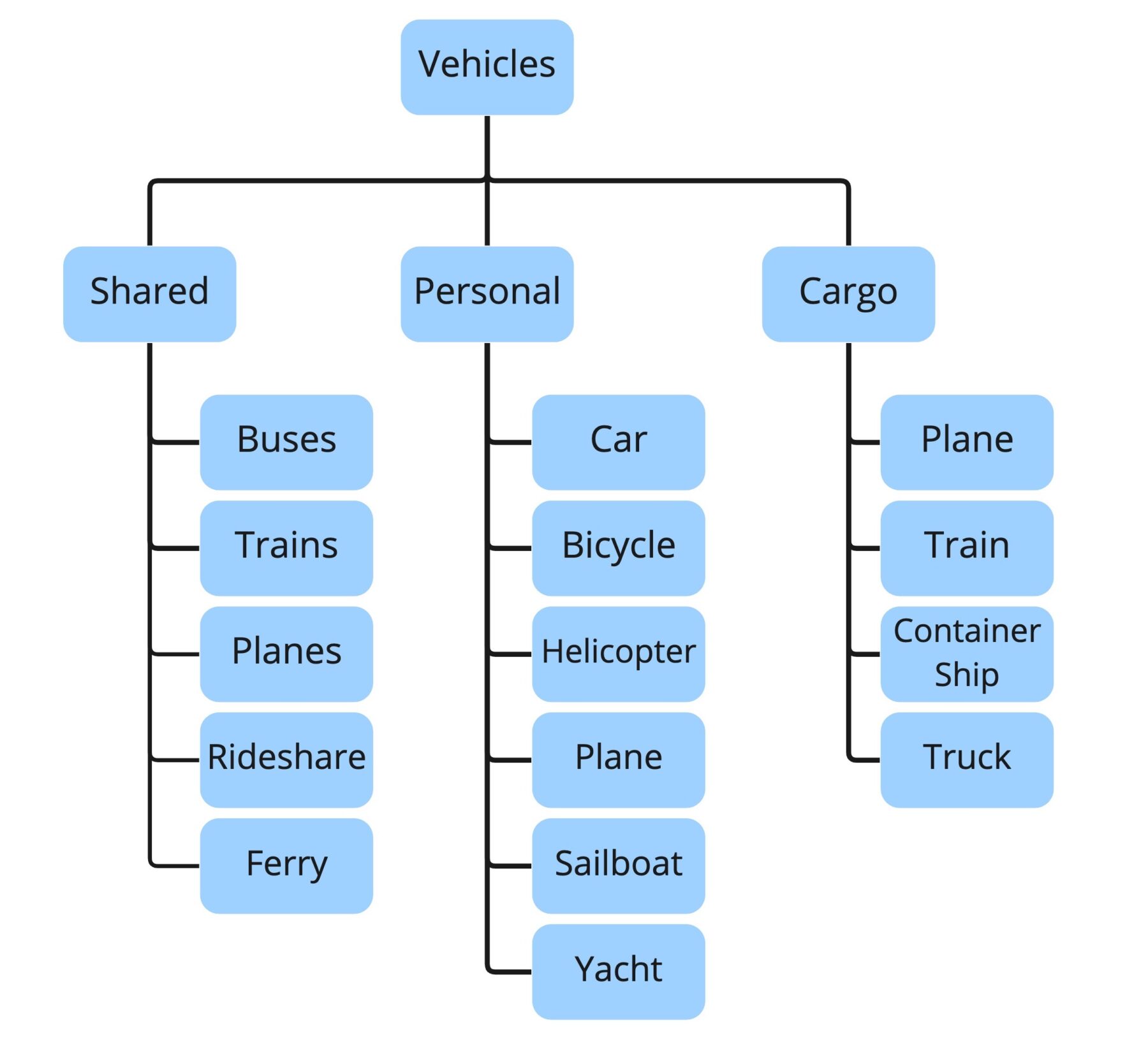
This hierarchical structure helps users navigate through your content more efficiently, ultimately promoting a positive user experience.
What a Taxonomy is Not
It’s easy to confuse taxonomy with other organizational tools, but they aren’t the same thing. A taxonomy is more than just your website's navigation menu, a sitemap, or a simple list of all your content. While those elements help users find things, a taxonomy is the underlying strategic framework that defines how your content is classified and how different pieces relate to one another. Think of it as the architectural blueprint for your information. Your navigation menu is like the hallway signs that guide people, but the taxonomy is the logic that determined why the rooms are organized that way in the first place. It’s a structured system that brings order and meaning to your entire content library.
Taxonomy vs. Metadata
Taxonomy and metadata are partners in crime when it comes to content organization, but they play distinct roles. The simplest way to think about it is that taxonomy is the structure, while metadata provides the details. Imagine a digital filing cabinet: your taxonomy is the set of drawers and folders, neatly organized by topic (e.g., "Installation Guides," "Troubleshooting," "API Reference"). Metadata, on the other hand, consists of the labels you put on each individual file inside those folders, like "Product: X," "Version: 2.1," or "Audience: Developer." You need both to effectively manage your content. The taxonomy creates a logical hierarchy, and metadata adds rich, specific context that makes each piece of content highly discoverable and reusable.
Types of Taxonomy Structures
Not all taxonomies are built the same. The structure you choose depends entirely on your content's complexity and how you expect users to find it. Some systems are simple and linear, while others are multi-dimensional, allowing for more dynamic discovery. Understanding the fundamental types of taxonomy is the first step toward building a system that works for your content and your audience. Let's look at the most common structures you'll encounter.
Hierarchical Taxonomy
A hierarchical taxonomy is likely the structure you’re most familiar with. It organizes information into a top-down structure of parent and child relationships, creating a clear and logical path. Think of it like a family tree or the folder system on your computer. A typical hierarchy might look something like: Clothing > Shirts > T-Shirts. This model is intuitive and works well for content that has a clear, established order. For technical documentation, this could mean organizing content by product line, then by specific product, then by feature. While straightforward, its rigidity can be a limitation if a piece of content logically fits into more than one category.
List Taxonomy
The simplest approach is a list taxonomy, which is essentially a flat collection of related terms or items with no hierarchy. Imagine a shopping list or the tags on a blog post—these are basic lists that group similar things together. For example, a list of keywords for a set of articles might include "API," "Troubleshooting," and "Installation." This structure is easy to create and maintain for small, simple content sets. However, as the list grows, it can become difficult for users to work with. Without any parent-child relationships to guide them, a long list can quickly become overwhelming and less useful for finding specific information.
Tree Taxonomy
A tree taxonomy is a step up from a simple list, grouping multiple lists under main categories. It’s like having several different folder trees that don't necessarily connect to each other. For instance, you might have one tree for user guides and another for API documentation. While this adds a layer of organization that a simple list lacks, it can be tricky to keep the structure consistent across the different trees. Without strong content governance, you risk creating confusing and siloed user experiences where related information is hard to connect because it lives in separate branches.
Polyhierarchical Taxonomy
A polyhierarchical taxonomy offers more flexibility by allowing an item to belong to more than one category. This structure acknowledges that a single piece of content can be relevant in multiple contexts. For example, a topic on "blood tests" could be categorized under resources for patients *and* resources for doctors. In technical documentation, a troubleshooting guide for a specific error code might apply to several different products. This model reflects how people often think and search for information, making it a powerful way to manage content that serves diverse audiences or purposes without duplicating it.
Facet System
For complex digital content, a facet system is often the most effective and flexible structure. Instead of a rigid hierarchy, it uses clear attributes—or "facets"—to classify content in multiple ways at once. Think of the filters on an e-commerce site that let you sort products by size, color, and brand. In technical documentation, facets could include product version, user role, operating system, or task type. This allows users to drill down to the exact information they need from multiple starting points. A robust Component Content Management System (CCMS) is essential for managing a faceted taxonomy, as it relies on structured content and metadata to work effectively.
The Business Case for a Strong Content Taxonomy
Taxonomy isn’t just about organizing user content; it also benefits content creators and managers. It helps them understand the content ecosystem better, identify gaps or overlaps, and ensure consistency across their content. This way, they can create a clear structure that aligns with their strategy and goals.
Taxonomies also help organizations create an efficient help site. By setting up a structure that categorizes and organizes content, users can search and navigate help sites with ease.
This makes content discoverable, improves user experience, and increases engagement. Users can easily find relevant articles, videos, or resources, and they spend less time searching and more time-consuming valuable content.
Improve Findability and Content Effectiveness
A strong taxonomy acts as a map for your content, creating a common language that guides users directly to the information they need. When you organize content into clear, logical categories and subcategories, you eliminate the guesswork for your audience. This structure makes it simple for them to find specific details quickly, which is especially critical in complex technical documentation. For content teams, this same structure makes it much easier to manage a large repository of information, ensuring consistency and preventing content from getting lost or becoming outdated. It transforms your content from a simple collection of articles into a highly effective, navigable knowledge base.
Enhance SEO and Personalization
Beyond the user experience on your site, a well-defined taxonomy significantly helps search engines understand your content's structure and relevance. This clarity can improve your ranking on search engine results pages, making it easier for new users to discover your resources. Taxonomy also serves as the foundation for personalization. By tagging content with metadata, you can deliver tailored information to different audiences or for specific product versions. This same metadata is what powers AI tools like chatbots, allowing them to pull accurate answers directly from your documentation. It’s the underlying framework that makes your structured content smart, adaptable, and ready for any channel.
How to Create Taxonomy Values That Work
When it comes to deciding which taxonomy values to use, it's important to think about what makes sense for your organization, industry, and audience. Here are some friendly tips to guide you:
- Stay relevant. Pick values that accurately represent and categorize your content.
- Speak their language. Use terms and phrases that your audience can easily understand.
- Make it easy to navigate. Create a hierarchy for your values that makes sense for users. Have broader categories and subcategories that reflect the relationships between different values.
- Plan for the future. Think about how your content might grow or change over time. Choose taxonomy values that can adapt and accommodate new topics or trends.
- Keep it consistent. Maintain consistency in your values across your content, and avoid using similar values that might confuse users.
- Listen to feedback. Ask for feedback from your users and content creators, and use their feedback to improve and refine your taxonomy.
Remember, the goal is to create a taxonomy that works well for your organization and audience. By following the tips above, you'll be on the right track to creating a user-friendly and effective taxonomy.
Start with User Research
The most effective taxonomy is built from the outside in. Your content's organization should reflect how your users think and what they need to accomplish, not how your internal teams are structured. As one usability expert puts it, your website's structure should be based on "what users need and the tasks they want to do." To get this right, you need to step into your users' shoes and see your content from their perspective. This means moving beyond assumptions and gathering real data about their behaviors and mental models. Two of the most reliable methods for this are card sorting and tree testing, which help you build and validate an intuitive structure.
Card Sorting
If you want to know how users group your content, just ask them. Card sorting is a straightforward research method where you give participants a list of your content topics (on digital or physical cards) and ask them to group them in a way that makes sense. This exercise helps you see how users naturally group content together, revealing their mental models without the influence of your existing site structure. The patterns that emerge from a card sorting session provide a powerful, user-generated blueprint for your main categories and subcategories. It’s a foundational step that ensures your taxonomy is based on user intuition from the very beginning.
Tree Testing
Once card sorting gives you a potential structure, tree testing helps you validate it. Think of it as a test run for your navigation before you build anything. In a tree test, you present users with your proposed hierarchical structure—the "tree"—and ask them to find specific pieces of information. The goal is to see if they can complete these tasks successfully and directly. This process checks if your planned navigation structure actually helps users find information. If users consistently get lost or choose the wrong path, you know your labels or groupings need refinement before you invest time and resources into implementation.
Establish Clear Organization Principles
With user research in hand, you can establish the core principles that will govern your taxonomy. This isn't about making arbitrary rules; it's about formalizing the logic your users have already shown you. The primary goal is to figure out your main content groups based on what users are looking for and the common tasks they perform. Are they trying to troubleshoot a problem, learn a new feature, or understand a concept? Your top-level categories should align with these high-level goals. Once these principles are defined, they become your guide for all future content decisions, ensuring consistency and scalability. A robust Component Content Management System (CCMS) can help enforce these principles by using metadata and structured content models to keep everything in its right place.
Avoid Common Pitfalls
Creating a taxonomy is as much about what you don't do as what you do. Even with the best intentions, it’s easy to fall into common traps that make content harder, not easier, to find. Vague labels, messy catch-all buckets, and confusing audience-based menus can undermine an otherwise solid structure. These pitfalls often arise from trying to make the content fit the organization's internal logic rather than the user's needs. Being aware of these common mistakes is the first step toward building a taxonomy that is clear, logical, and genuinely helpful for your users. Let's look at a couple of the most frequent offenders.
Eliminate "Catch-All" Categories
We’ve all seen them: vague, generic labels like "Resources," "General Information," or "FAQs." These terms are red flags in a taxonomy because they don't describe what's inside. As a result, they become dumping grounds for any content that doesn't have a clear home, making them cluttered and useless. As usability experts from Yale advise, you should avoid vague labels because they fail to tell users anything specific. If you find yourself needing a section for miscellaneous items, it’s a sign that your taxonomy needs more thought. Instead of creating a catch-all, challenge yourself to be more specific. For example, a "Resources" section could be broken out into more descriptive categories like "API Guides," "Video Tutorials," or "Best Practice Checklists."
Rethink Audience-Based Navigation
It might seem logical to organize your navigation by user type, such as "For Developers" or "For Administrators." However, this approach often creates problems. Users don't always fit neatly into one box, and they may need information from multiple sections. This forces them to guess which category they belong to, creating unnecessary friction. A better approach is to group content by topics, services, or tasks that different users might need. You can still tailor content for specific audiences, but this is better handled through metadata and filtering, not top-level navigation. Using a system that supports structured content, like DITA, allows you to tag content for different audiences and then publish personalized outputs, ensuring everyone gets the right information without navigating a confusing, siloed structure.
Real-World Applications of Taxonomy
Taxonomy isn't just a theoretical concept for information architects; it's a practical tool that shapes how we find and interact with information every day. From the technical manuals we rely on to the ads we see online, a well-designed taxonomy works behind the scenes to create order and relevance. Understanding how it’s applied in different fields can spark ideas for your own content strategy. These examples show just how versatile and essential a strong classification system is for delivering clear, findable, and useful content to any audience.
Taxonomy in Technical Documentation
In technical documentation, clarity is everything. Users often arrive with a specific problem and need a solution, fast. Taxonomy is the backbone of a great help experience, organizing vast libraries of information into clear categories and subcategories. This makes it easy for a user to find a specific set of instructions, a technical specification, or a troubleshooting guide without getting lost. For content teams, a solid taxonomy is fundamental to managing structured content effectively. It allows for consistent tagging, which in turn powers content reuse, personalization, and more efficient updates, ensuring users always get the right information for their specific needs.
Taxonomy in Advertising (IAB Content Taxonomy)
The advertising world relies on taxonomy to connect with the right audiences at the right time. The IAB Tech Lab’s Content Taxonomy, for example, provides a standardized "common language" for describing online content. This system helps advertisers with two critical tasks: contextual targeting and brand safety. It ensures that an ad for a new video game appears on a gaming review site, not a news article about a global crisis. By classifying content into precise categories, this taxonomy helps make advertising more relevant for consumers and protects a brand’s reputation by controlling where its message appears.
Taxonomy in Science and Education
Taxonomy has its roots in science, where it’s used to classify everything from plants and animals to chemical elements. Think of the Linnaean system in biology, which groups organisms based on shared characteristics. This same principle applies to how we organize knowledge in education. A library’s card catalog or a university’s online course directory are both examples of taxonomy at work. The goal is to create a logical system of classes that helps people find what they're looking for, whether it's a specific book on a shelf or the right research paper in a massive academic database.
Using a CCMS to Build and Manage Your Taxonomy
A component content management system (CCMS) is one of the most efficient tools for establishing taxonomies. It helps you create, organize, and maintain your content components in a smart and structured manner.
Here are a few features and functionalities that can help organizations establish taxonomies effortlessly.
Build on a Foundation of Structured Authoring
A CCMS allows you to create content in smaller, modular pieces, also known as “structured content.”
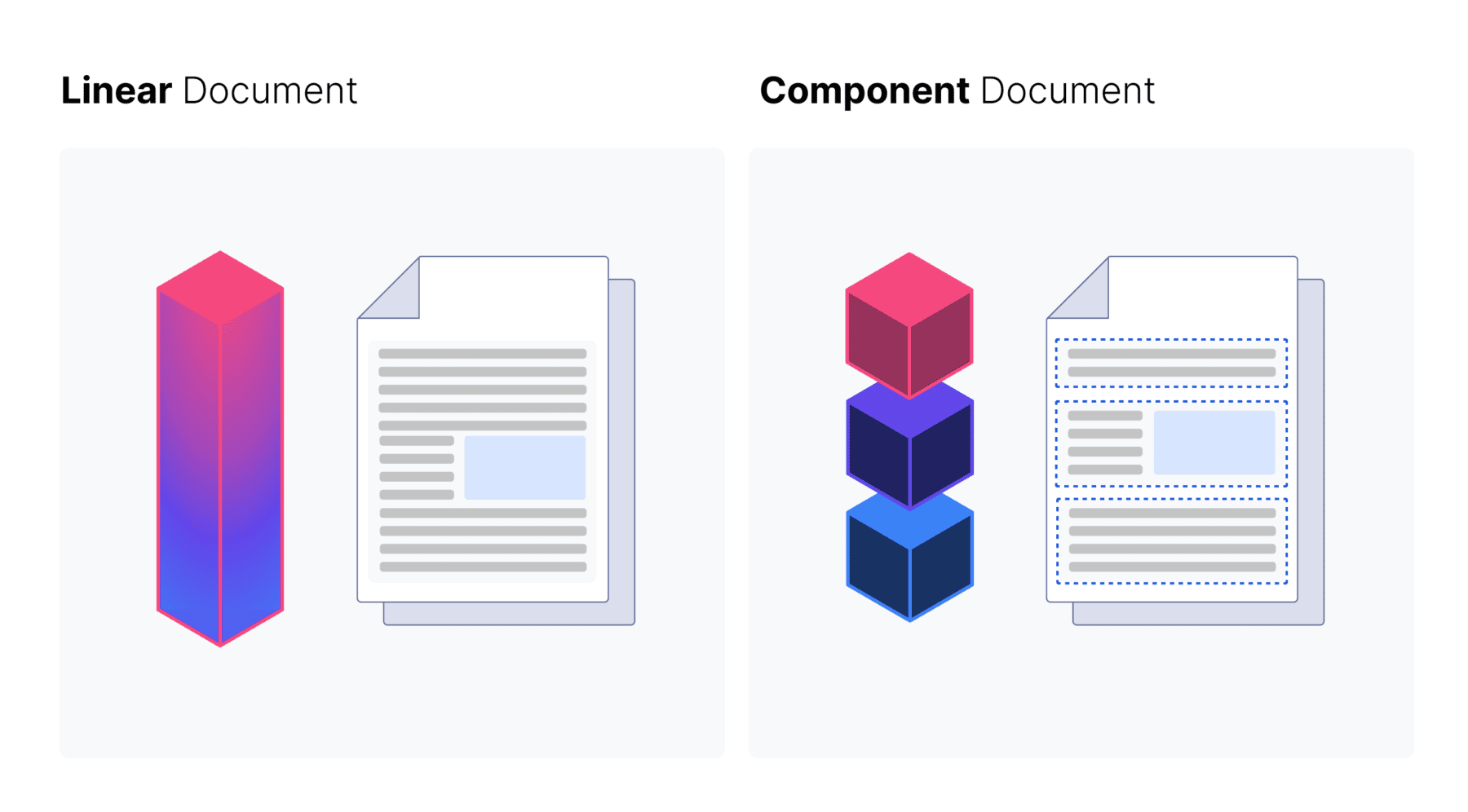
This means you can break down your content into digestible chunks, which can be tagged with important information like keywords, topics, or attributes. These tags become the building blocks of your taxonomy categories.
Centralize Your Metadata Management
A CCMS also helps you manage all the metadata associated with your content. With the CCMS, you can define metadata fields and attributes that align with your desired taxonomy categories. This ensures consistency and accuracy in classifying your content within the taxonomy structure.
Create and Manage Taxonomies at Scale
A CCMS typically provides user-friendly tools that allow you to define:
- Categories
- Subcategories
- Hierarchical relationships
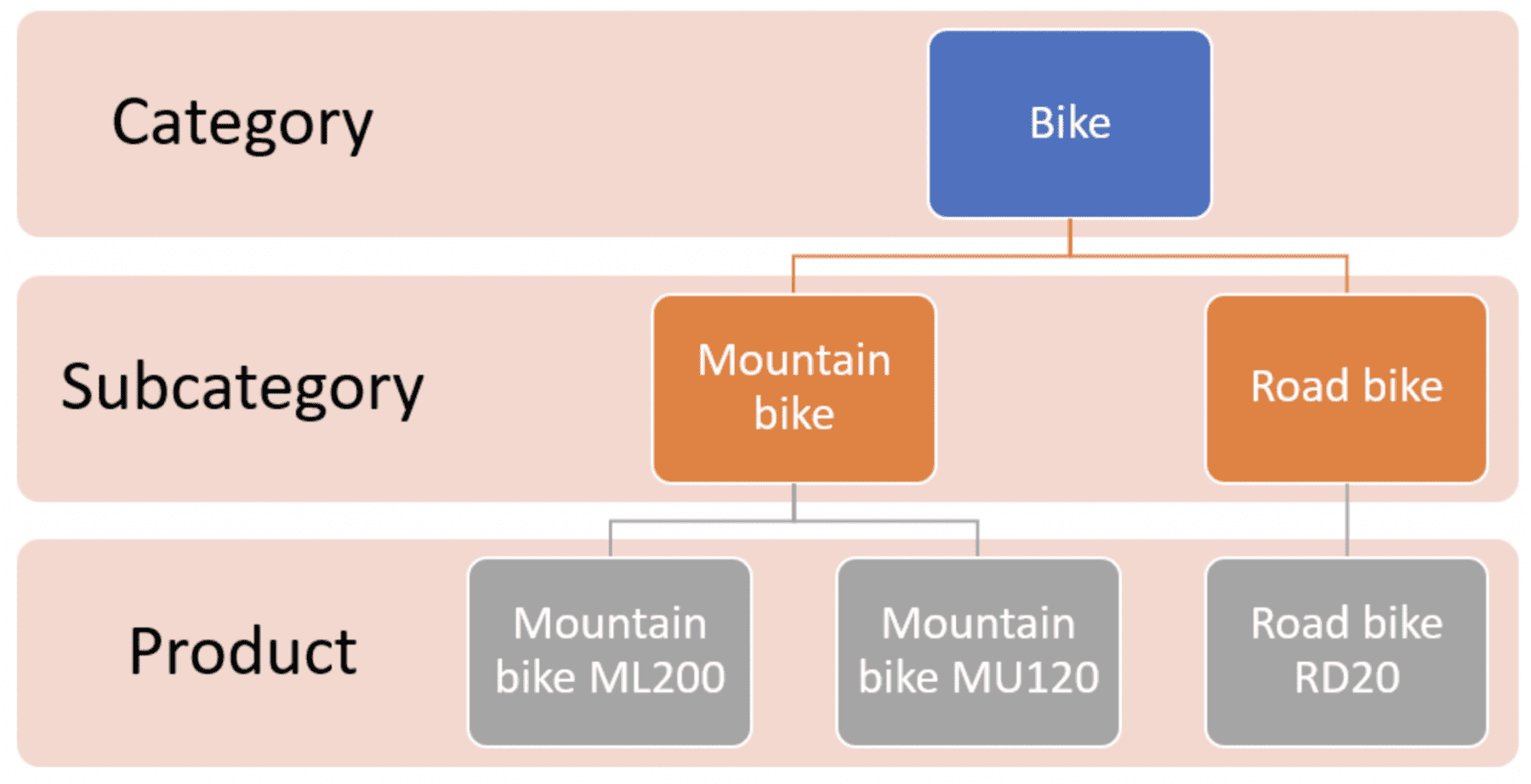
You can easily organize your content components into the right places within the taxonomy, ensuring a well-structured and logical framework.
Ensure Consistent Content Tagging
With a CCMS, content creators can easily tag and classify content components according to the established taxonomy. They can assign relevant metadata values to the content, indicating its category, topic, or other relevant attributes. This makes locating and retrieving content based on specific categories or attributes easy.
Implement Taxonomy Governance and Maintenance
Building your taxonomy is a great first step, but the real value comes from keeping it healthy and effective over time. A taxonomy isn't a one-time project; it's a living system that needs consistent care. Without a plan for upkeep, even the most thoughtfully designed structure can become cluttered and confusing. This is where governance comes into play. It’s about creating a clear set of rules for how to use the taxonomy and ensuring everyone on your team follows them. A strong content governance framework ensures that as your content library grows, your taxonomy scales with it, remaining a reliable tool for both your team and your users.
Effective maintenance starts with documenting your decisions. Write down how your content is organized and what belongs in each category. This guide becomes the single source of truth for your team, ensuring consistency. From there, make a habit of regularly reviewing your taxonomy’s performance. Watch how users interact with your content and gather their feedback. Are they finding what they need? Are some tags or categories going unused? Use these insights to make informed adjustments, ensuring your taxonomy continues to meet the needs of your audience and supports your content strategy effectively.
Power a Better Search Experience
A CCMS also offers powerful search and filtering capabilities based on your taxonomy. Users can perform faceted searches, applying filters based on specific categories or attributes. This means they can quickly find the content they're looking for, resulting in a positive user experience.
A Strong Taxonomy Creates a Better User Experience
Taxonomy is a key practice for organizing and categorizing content, making it easily discoverable and enhancing the user experience. Organizations can improve content management, ensure consistency, and increase user engagement by creating a clear structure and applying taxonomy.
Are you ready to start enhancing the user experience? Heretto Deploy API makes creation efficient and effective. Start by booking a demo today, or learn more about Heretto Deploy Portal!
Frequently Asked Questions
What's the real difference between a taxonomy and my website's navigation menu? Think of your taxonomy as the architectural blueprint for your entire content library. It’s the deep, strategic thinking that decides how every piece of information is classified and related. Your website navigation is more like the signs in the hallway that guide people to the right rooms. The navigation is a direct result of your taxonomy, but the taxonomy itself is the foundational logic that makes sure the whole building is organized sensibly.
How do I choose the right taxonomy structure for my technical documentation? The best structure depends on the complexity of your content and the needs of your users. If your documentation is straightforward, a simple hierarchical structure (like a folder tree) is a great place to start. For more complex content libraries where information applies to multiple products or user roles, a facet system is more powerful. It allows users to filter content by attributes like version, operating system, or task, giving them multiple paths to the right answer.
My content library is already a mess. Is it too late to implement a taxonomy? It's never too late, and you don't have to fix everything at once. The best approach is to start with your most critical or frequently used content. Conduct a small content audit, identify the main user tasks, and build a simple structure for that section first. By tackling it piece by piece, you can make steady progress without feeling overwhelmed. An iterative approach is much more sustainable than trying to reorganize everything overnight.
How does a CCMS make managing a taxonomy easier than just using shared folders? A Component Content Management System (CCMS) gives you the tools to enforce your taxonomy rules automatically. Instead of relying on manual folder organization and file naming conventions, a CCMS uses structured content and metadata. This means every piece of content is tagged with specific attributes, making it instantly findable and reusable. It provides a centralized way to manage these rules, ensuring everyone on your team classifies content consistently and preventing the system from breaking down over time.
What if I don't have the resources for big user research studies like card sorting? You don't need a huge budget to understand your users. Start by looking at the data you already have. What are the most common search queries on your help site? What questions does your support team answer most often? This information is a goldmine for understanding what users are looking for. You can also conduct informal interviews with a few friendly customers to learn about their goals and how they think about your content.